Create Webhook
This article is about the legacy version of webhooks in NocoDB. For the latest features and improvements, refer to Webhook v3.
Create Webhook
Accessing webhook page
- In the left sidebar, click the table for the webhook.
- In the toolbar, open
Tools. - Click
Webhooks. - Click
Add New Webhook.
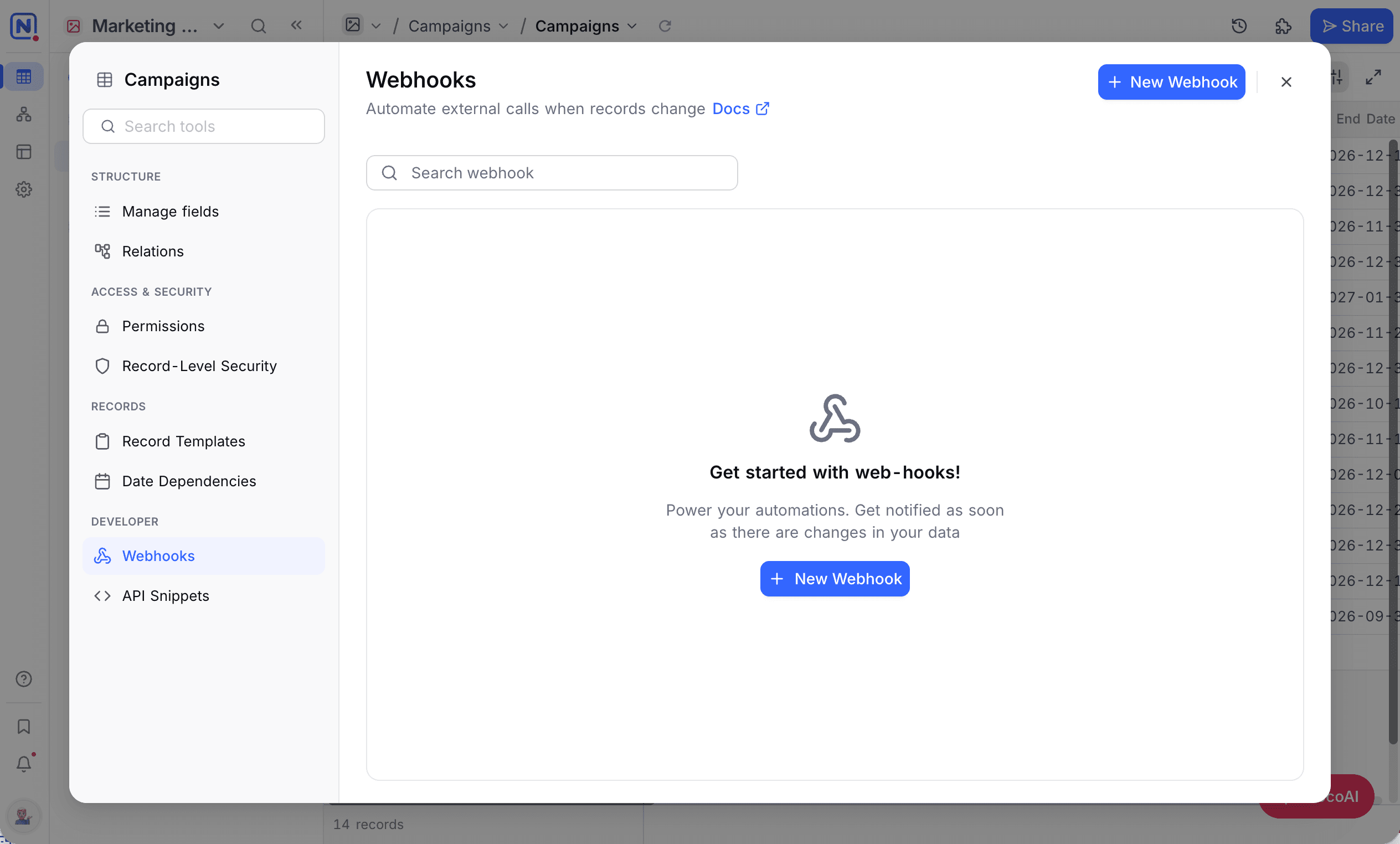
Configuring webhook
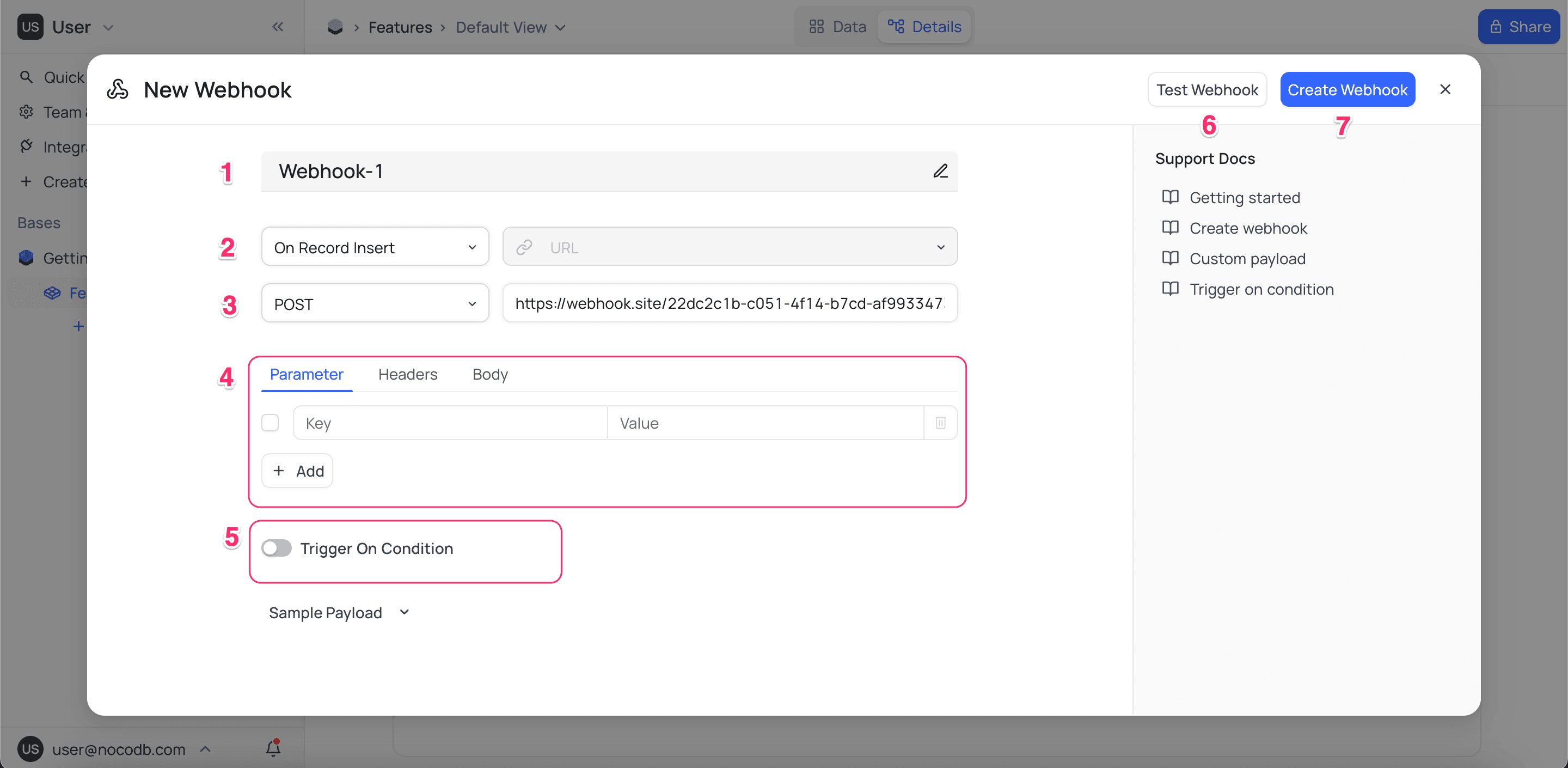
- Enter the name of the webhook.
- Select the event that triggers the webhook.
| Trigger | Details |
|---|---|
| After Record Insert | After a single record is inserted |
| After Record Update | After a single record is updated |
| After Record Delete | After a single record is deleted |
| After Multiple Record Insert | After bulk records are inserted |
| After Multiple Record Update | After bulk records are updated |
| After Multiple Record Delete | After bulk records are deleted |
| Manual Trigger | You trigger the webhook manually with a button field |
- Method & URL: Set the endpoint that the webhook calls. Supported methods are GET, POST, DELETE, PUT, HEAD, PATCH.
- Headers & Parameters: Set the request headers and parameters (optional).
- Condition: Set criteria. Only records that meet the criteria trigger the webhook (optional).
- Test the webhook with a sample payload to make sure that the parameters are correct (optional).
- Save the webhook.
For more information about the Manual Trigger webhook and how to use it with the Button field, refer to Button field.
Webhook with conditions
In a webhook with conditions, only records that meet the criteria trigger the webhook. For example, trigger the webhook only when Status is Complete. You can also set many conditions with the AND or OR operators. For example, trigger the webhook only when Status is Complete and Priority is High.
The webhook triggers only if the condition was not met before the record update. For example, the condition is Status is Complete and Priority is High:
| Record before update | Change | Webhook triggers |
|---|---|---|
Status Complete, Priority Low | Change Priority from Low to High | Yes |
Status Complete, Priority High | Update any other field | No |
In summary, the webhook triggers only when Condition(old-record) = false and Condition(new-record) = true.
Webhook response sample
{
    "type" : "records.after.insert",
    "id": "9dac1c54-b3be-49a1-a676-af388145fa8c",
    "data": {
        "table_id": "md_xzru7dcqrecc60",
        "table_name": "Film",
        "view_id": "vw_736wrpoas7tr0c",
        "view_name": "Film",
        "records": [
            {
                "FilmId": 1011,
                "Title": "FOO",
                "Language": {
                    "LanguageId": 1,
                    "Name": "English"
                },
            }
        ]
    }
}
{
"type": "records.after.update",
"id": "6a6ebfe4-b0b5-434e-b5d6-5212adbf82fa",
"data": {
"table_id": "md_xzru7dcqrecc60",
"table_name": "Film",
"view_id": "vw_736wrpoas7tr0c",
"view_name": "Film",
"previous_records": [
{
"FilmId": 1,
"Title": "ACADEMY DINOSAUR",
"Description": "A Epic Drama of a Feminist in The Canadian Rockies",
"Actor List": [
{
"ActorId": 10,
"FirstName": "CHRISTIAN"
}
],
}
],
"records": [
{
"FilmId": 1,
"Title": "ACADEMY DINOSAUR (Edited)",
"Actor List": [
{
"ActorId": 10,
"FirstName": "CHRISTIAN"
}
],
}
]
}
} {
"type": "records.after.delete",
"id": "e593079f-70e5-4965-8944-5ff7aeed005c",
"data": {
"table_id": "md_xzru7dcqrecc60",
"table_name": "Film",
"view_id": "vw_736wrpoas7tr0c",
"view_name": "Film",
"records": [
{
"FilmId": 1010,
"Title": "ALL-EDITED",
"Language": {
"LanguageId": 1,
"Name": "English"
},
}
]
}
}{
"type": "records.after.bulkInsert",
"id": "f8397b06-a399-4a3a-b6b0-6d1c0c2f7578",
"data": {
"table_id": "md_xzru7dcqrecc60",
"table_name": "Film",
"view_id": "vw_3fq2e9q8drkblw",
"view_name": "GridView",
"records_inserted": 2
}
}{
"type": "records.after.bulkUpdate",
"id": "e983cea5-8e38-438e-96a0-048751f6830b",
"data": {
"table_id": "md_xzru7dcqrecc60",
"table_name": "Film",
"view_id": "vw_3fq2e9q8drkblw",
"view_name": "Sheet-1",
"previous_records": [
[
{
"FilmId": 1005,
"Title": "Q",
"Language": {
"LanguageId": 1,
"Name": "English"
},
},
{
"FilmId": 1004,
"Title": "P",
"Language": {
"LanguageId": 1,
"Name": "English"
}
}
]
],
"records": [
[
{
"FilmId": 1005,
"Title": "Q-EDITED",
"Language": {
"LanguageId": 1,
"Name": "English"
}
},
{
"FilmId": 1004,
"Title": "P-EDITED",
"Language": {
"LanguageId": 1,
"Name": "English"
}
}
]
]
}
} {
"type": "records.after.bulkDelete",
"id": "e7f1f4e5-7052-4ca2-9355-241ceb836f43",
"data": {
"table_id": "md_xzru7dcqrecc60",
"table_name": "Film",
"view_id": "vw_3fq2e9q8drkblw",
"view_name": "Sheet-1",
"records": [
[
{
"FilmId": 1022,
"Title": "x",
"Language": {
"LanguageId": 1,
"Name": "English"
},
},
{
"FilmId": 1023,
"Title": "x",
"Language": {
"LanguageId": 1,
"Name": "English"
},
}
]
]
}
}{
"type": "records.manual.trigger",
"id": "551a2010-d658-4185-a050-cf3fca56a5a9",
"data": {
"table_id": "mzo4r3zrbcph43i",
"table_name": "Features",
"rows": [
{
"Id": 1,
"Title": "dstala",
"CreatedAt": "2024-08-12 11:56:15+00:00",
"UpdatedAt": "2024-08-12 11:56:48+00:00",
"Button": {
"type": "url",
"label": "Button",
"url": "https://github.com/dstala"
},
}
]
}
}Webhook with custom payload
You can set a custom payload for your webhook in the Body tab. Use handlebar syntax to get and change the data.
Use {{ json event }} to get the event data. This is a sample response:
{
  "type": "records.after.insert",
  "id": "0698517a-d83a-4e72-bf7a-75f46b704ad1",
  "data": {
    "table_id": "m969t01blwprpef",
    "table_name": "Table-2",
    "view_id": "vwib3bvfxdqgymun",
    "view_name": "Table-2",
    "rows": [
      {
        "Id": 1,
        "Tags": "Sample Text",
        "CreatedAt": "2024-04-11T10:40:20.998Z",
        "UpdatedAt": "2024-04-11T10:40:20.998Z"
      }
    ]
  }
}
Discord Webhook
You can set a Discord webhook to send messages to a Discord channel. The Discord request body must contain content, embeds, or attachments. If it does not, the request fails. This is an example of a Discord webhook payload. For more details, refer to the Discord webhooks guide.
{
  "content": "Hello, this is a webhook message",
  "embeds": [
    {
      "title": "Webhook",
      "description": "This is a webhook message",
      "color": 16711680
    }
  ]
}
To send the complete event data to Discord, use this payload:
{
  "content" : {{ json ( json event ) }}
}
You can also change the payload as necessary. For example, to send only the Title field to Discord, use this payload. The Discord channel shows the value of content.
{
   "content": "{{ event.data.rows.[0].Title }}"
}
Environment Variables
In the self-hosted version, you can set these environment variables to change how webhooks work:
| Variable | Description | Default |
|---|---|---|
| NC_ALLOW_LOCAL_HOOKS | Allow webhooks to call localhost links. | false |
For more details, refer to environment variables.
Last updated on