Date Dependencies
Date dependencies keep your project schedule up to date automatically. When one record moves, every record that depends on it moves too. You do not need to update them manually.
For example, if a design phase is a week late, the development and QA records after it move forward automatically. They stay in sequence.
Requirements
Your table must have these fields before you can turn on date dependencies:
| Field | Type | Purpose |
|---|---|---|
| Start Date | Date | The date that the record starts |
| End Date | Date | The date that the record ends |
| Duration | Number or Duration | The number of days that the record lasts. A Number field stores days directly. NocoDB converts a Duration field to days internally. Optional: NocoDB can calculate the duration from the start and end dates. |
| Successor Link | Link (self-referencing Has-Many, One-to-Many, or One-to-One) | Points each row to the tasks scheduled after it. Optional: you need it only if you want records to cascade automatically. |
Setting up date dependencies
- In the left sidebar, click
...next to the table name. - Select Date Dependencies.
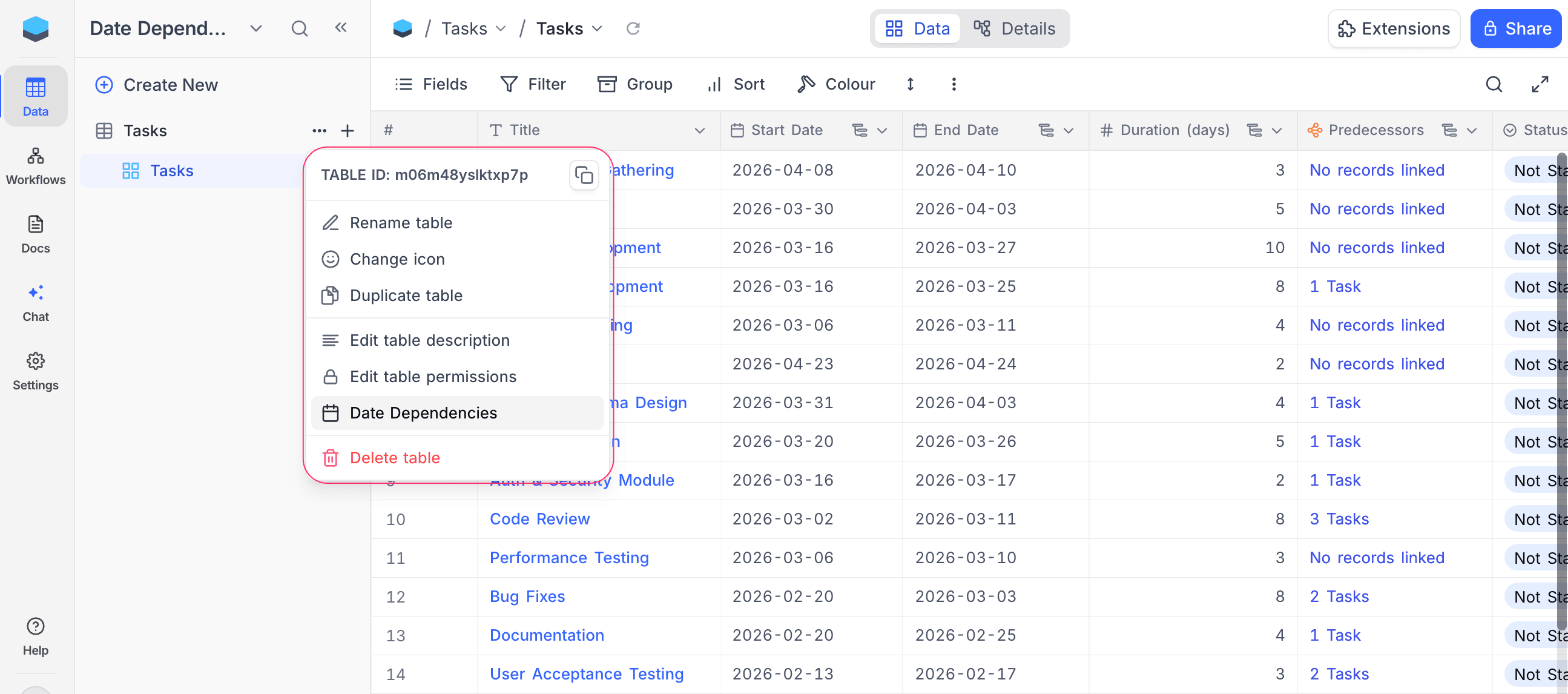
The Date Dependencies tool opens in the table's Tools panel. Date dependencies are off.
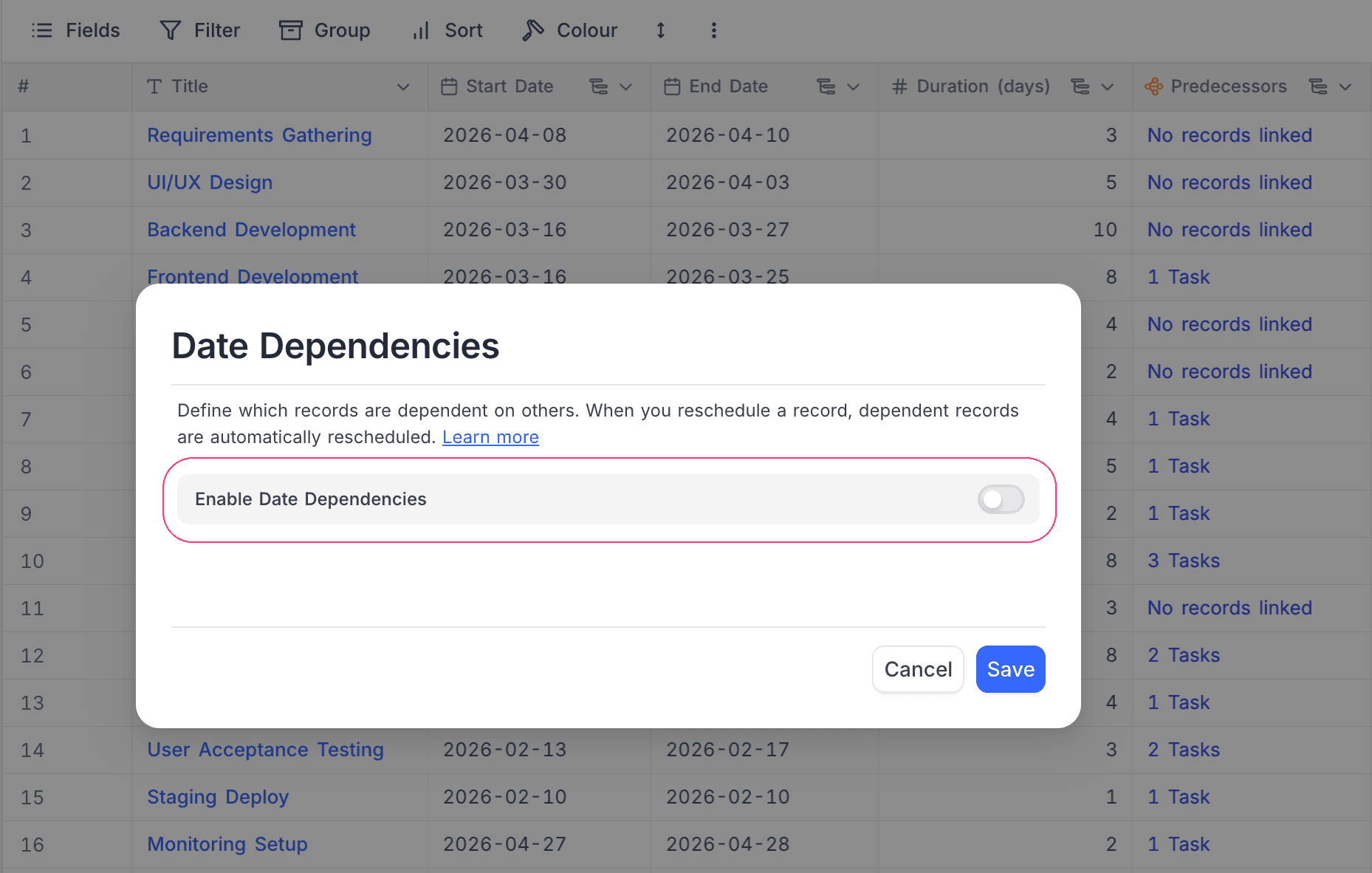
- Turn on Enable Date Dependencies.
- Select your Start Date field.
- Select your End Date field.
- Optional: select a Duration field (Duration or Number type).
- Optional: select a Successor Link field. This turns on automatic cascading across records.
- Click Save.
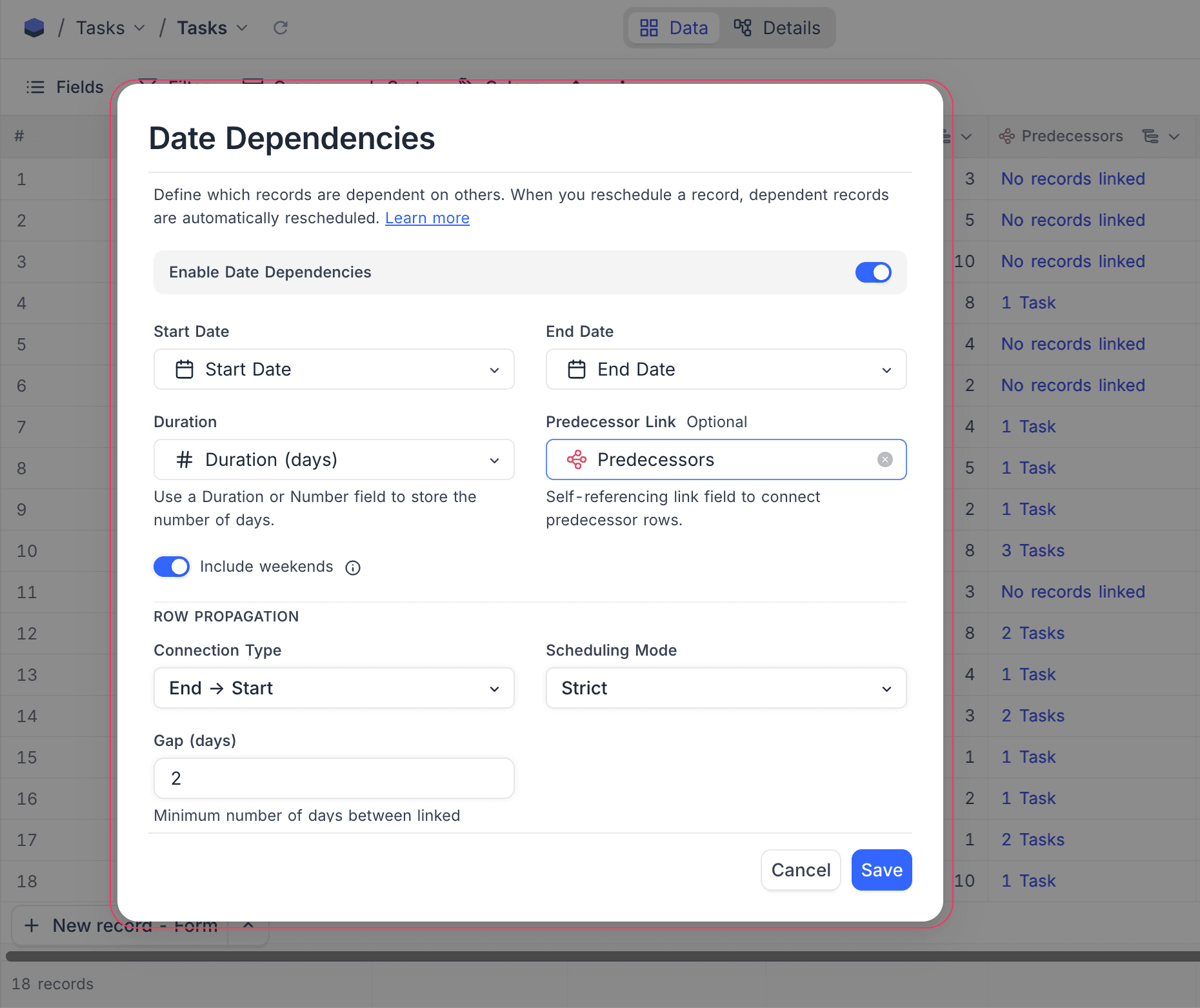
Include weekends
By default, date calculations include all calendar days, weekends too. To skip Saturdays and Sundays in all calculations, turn off Include weekends.
When Include weekends is off:
| Item | Result | Example |
|---|---|---|
| Duration | Counts only business days (Mon–Fri). | A record from Monday to Friday is 5 days, not 7. |
| End Date | Skips weekends. | A record that starts on Monday with a 6-day duration ends on the next Monday. Saturday and Sunday are skipped. |
| Cascading | Puts dependent records on the next business day, never on a Saturday or Sunday. |
How fields stay in sync within a record
When date dependencies are on, NocoDB keeps the date fields in sync each time you edit a record:
| You change… | NocoDB auto-updates… |
|---|---|
| Start Date | End Date moves to keep the same duration |
| End Date | Duration changes to match the new span |
| Duration | End Date changes to match the new length |
When all three fields have values, Start Date and End Date have priority, and NocoDB calculates the duration again.
Duration counting is inclusive: NocoDB counts the start date and the end date. For example, a record from Jan 1 to Jan 10 has a duration of 10 days. A duration of 0 is valid. It is a same-day task, where the start date and the end date are the same.
All calculations use the Include weekends setting.
Row propagation
When you set a Successor Link field, NocoDB can move dependent records automatically to keep your timeline consistent. Cascading works in both directions:
| Direction | What happens |
|---|---|
| Forward | When the dates of a predecessor change, its successors move later to prevent overlap. |
| Backward | When you move a successor earlier and it overlaps its predecessor, the predecessor moves earlier to make room. |
Scheduling mode
Select how linked records change when dates change:
| Mode | What happens |
|---|---|
| Off | No automatic rescheduling across linked records. Only field sync in a record applies. |
| Flexible | Records move only when dates overlap or break the gap. If there is already enough space, nothing moves. |
| Strict | Records always move to the exact gap. No extra space is allowed. Records move even when there is no overlap. |
Flexible vs Strict — example
Two records have an End → Start connection and Gap = 2 days:
Before — gap is 9 days (well above the required 2):

Design:      ████████████
Development:                              ████████████
             Jan 1    Jan 10              Jan 20    Jan 29
                              ←── 9 days ──→
You move the End Date of Design to Jan 14:
Flexible — gap shrinks to 5, still ≥ 2, so nothing moves:

Design:      ████████████████
Development:                              ████████████
             Jan 1        Jan 14          Jan 20    Jan 29
                              ←─ 5 days ─→  ✓ no violation
Strict — snaps to exact gap of 2, Development shifts:
Design: ████████████████
Development: ████████████
Jan 1 Jan 14 Jan 17 Jan 26
←2→In short, Flexible only prevents overlap. Strict always keeps the exact spacing.
Connection type
Select how a predecessor record and a successor record relate:
| Type | Meaning | Example |
|---|---|---|
| End → Start | The successor starts after the predecessor ends | Design ends → Development starts. This is the most common type. |
| Start → Start | The successor starts after the predecessor starts | Design starts → QA monitoring starts at the same time. |
| End → End | The successor ends after the predecessor ends | Development ends → Documentation ends at the same time. |
| Start → End | The successor ends after the predecessor starts | Setup must be done before the event starts. |
Connection type examples
These examples use Strict mode with Gap = 0 to show each connection type. The predecessor is Design (Jan 1 – Jan 10, 10 days).
End → Start: Development starts the day after Design ends.
| Record | Start Date | End Date | Duration |
|---|---|---|---|
| Design | Jan 1 | Jan 10 | 10 days |
| Development | Jan 11 | Jan 20 | 10 days |
If the End Date of Design moves to Jan 15, Development moves to start on Jan 16.
Start → Start: Development starts on the same day as Design.
| Record | Start Date | End Date | Duration |
|---|---|---|---|
| Design | Jan 1 | Jan 10 | 10 days |
| Development | Jan 1 | Jan 10 | 10 days |
If the Start Date of Design moves to Jan 5, Development moves to start on Jan 5.
End → End: Development ends on the same day as Design.
| Record | Start Date | End Date | Duration |
|---|---|---|---|
| Design | Jan 1 | Jan 10 | 10 days |
| Development | Jan 1 | Jan 10 | 10 days |
If the End Date of Design moves to Jan 15, Development moves to end on Jan 15. Its Start Date changes to Jan 6 to keep the duration.
Start → End: Development ends on the same day that Design starts.
| Record | Start Date | End Date | Duration |
|---|---|---|---|
| Design | Jan 1 | Jan 10 | 10 days |
| Development | Dec 23 | Jan 1 | 10 days |
If the Start Date of Design moves to Jan 5, Development moves to end on Jan 5. Its Start Date changes to Dec 27 to keep the duration.
Gap (days)
Set a minimum number of days between records. For example, with the End → Start connection type:
| Gap | Result |
|---|---|
| Gap = 0 | The successor starts on the day after the predecessor ends. |
| Gap = 3 | There are 3 days between the end of the predecessor and the start of the successor. |
When Include weekends is off, gap days count only business days.
Examples
Basic cascade (Strict, End → Start, Gap = 0)
Three records are in sequence: Design → Development → QA.
Before:

Design:      ██████████
Development:           ██████████
QA:                               ██████████
             Jan 1  Jan 10  Jan 20  Jan 30
Design takes longer, so you move its End Date to Jan 20. NocoDB moves the other records automatically:
After — cascade ripples forward:

Design:      ████████████████████
Development:                     ██████████
QA:                                         ██████████
             Jan 1            Jan 20     Jan 30     Feb 9
Each successor keeps its original duration, and the sequence stays the same.
Backward cascade (Strict, End → Start, Gap = 0)
The same three records are used. You move Development earlier so it starts on Jan 5. It now overlaps Design, which ends on Jan 10:
Before:

Design:      ██████████
Development:           ██████████
QA:                               ██████████
             Jan 1  Jan 10  Jan 20  Jan 30
You move Development to Jan 5 — it now overlaps Design:
Design: ██████████
Development: ██████████
Jan 5 Jan 14
↑ collision!NocoDB moves Design earlier to make room:
After — Design shifts backward:

Design: ██████████
Development:       ██████████
QA:                                    ██████████
        Dec 26  Jan 4  Jan 5  Jan 14   Jan 21  Jan 30
Design keeps its original duration and moves earlier. Development can then start on Jan 5 without overlap.
Working days cascade
This is the same setup, but Include weekends is off. Design ends on Friday Jan 10:
| Record | Start Date | End Date | Duration |
|---|---|---|---|
| Design | Mon, Jan 6 | Fri, Jan 10 | 5 days |
| Development | Mon, Jan 13 | Fri, Jan 17 | 5 days |
Development starts on Monday, the next business day, not on Saturday.
Automations and webhooks
When NocoDB reschedules dependent records automatically, the automations and webhooks on the table run for those updated records. Use them to notify your team, update a connected tool, or start a follow-up action.
Things to know
- Each table can have one date dependency configuration.
- Start Date and End Date must be Date fields (not DateTime).
- Duration must be a Duration or Number field.
- The Successor Link must be a self-referencing link field (Has-Many, One-to-Many, or One-to-One).
- Include weekends applies everywhere: to field sync in a record and to cascading across records.
- Row propagation (cascade across linked records) works only on PostgreSQL and MySQL 8+ data sources.
- When NocoDB reschedules dependent records automatically, the grid shows them with a light yellow background for a short time. This shows which records changed. The highlight goes away after about 2 seconds.
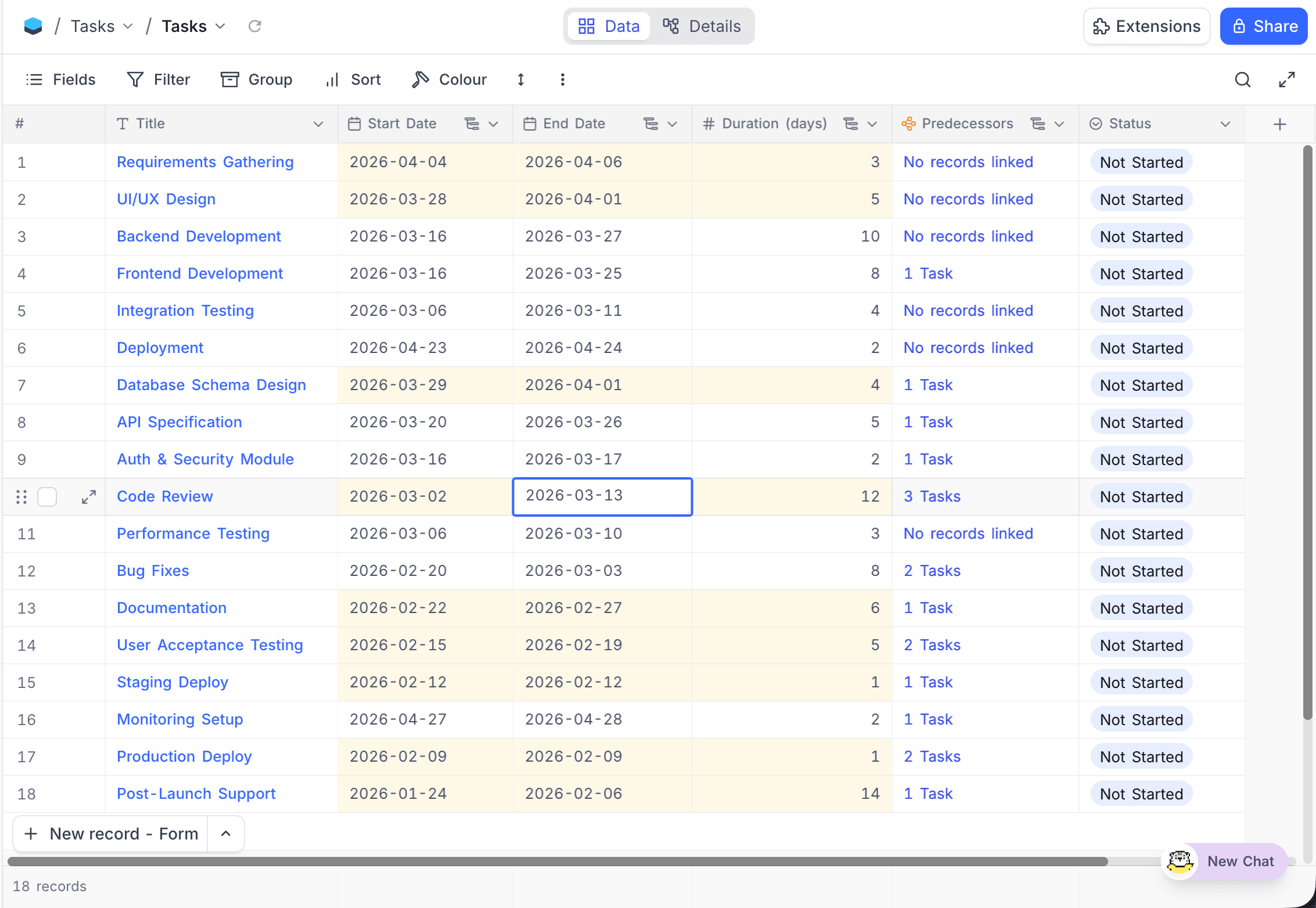
- Fields in an active date dependency configuration show a small icon in their column header. When you hover over the icon, the tooltip "Date dependencies enabled" shows.
- If you delete a Start Date or End Date field that a date dependency configuration uses, NocoDB deactivates the configuration automatically. If you delete a Duration or Successor Link field, NocoDB clears only that field reference. The configuration can stay active.
- The audit trail logs cascade row updates as a separate cascade update type. This lets you tell them apart from manual edits.
- Sibling records are not re-propagated. When you move a record earlier and NocoDB moves its predecessor earlier, the other successors of that predecessor (sibling records) are not checked again. NocoDB changes only the direct chain: the predecessors above the edited record and the successors below it. To update sibling records, edit one of them. This starts a new cascade.
FAQs
What's the difference between Flexible and Strict?
Flexible moves records only when they would overlap or break the gap. If there is already enough space, nothing changes. Strict always keeps the exact gap that you set. It moves records even when there is no overlap.
What if two records depend on each other in a loop?
NocoDB finds circular dependencies and stops the cascade safely. NocoDB does not update records in a loop.
Do automations fire when dates are rescheduled automatically?
Yes. The automations and webhooks on the table run for all records that a cascade updates.
What does "Include weekends" do?
When it is on (the default), NocoDB counts all calendar days, weekends too. When it is off, NocoDB skips Saturdays and Sundays in all date calculations. Duration counts only Mon–Fri, end dates are on weekdays, and rescheduled records never start on a weekend.
Which databases support row propagation?
Cascade propagation across linked records needs PostgreSQL or MySQL 8+. On other databases, such as SQLite, only field sync in a record (Start Date, End Date, and Duration calculations) is available.
Availability
- Date dependencies are available on NocoDB Cloud (Business plan and above) and licensed self-hosted deployments (Business plan and above).
Last updated on