Data Exporter
Overview
The Data Exporter extension makes it easy to export data from your NocoDB tables. With a few clicks, you can download a CSV file for any table and view in your base. The export runs asynchronously in the background, so you can continue to use the application. When your file is ready, you get a notification. You can then download the CSV to your local machine at any time.
Exporting Data
To export data from your NocoDB tables:
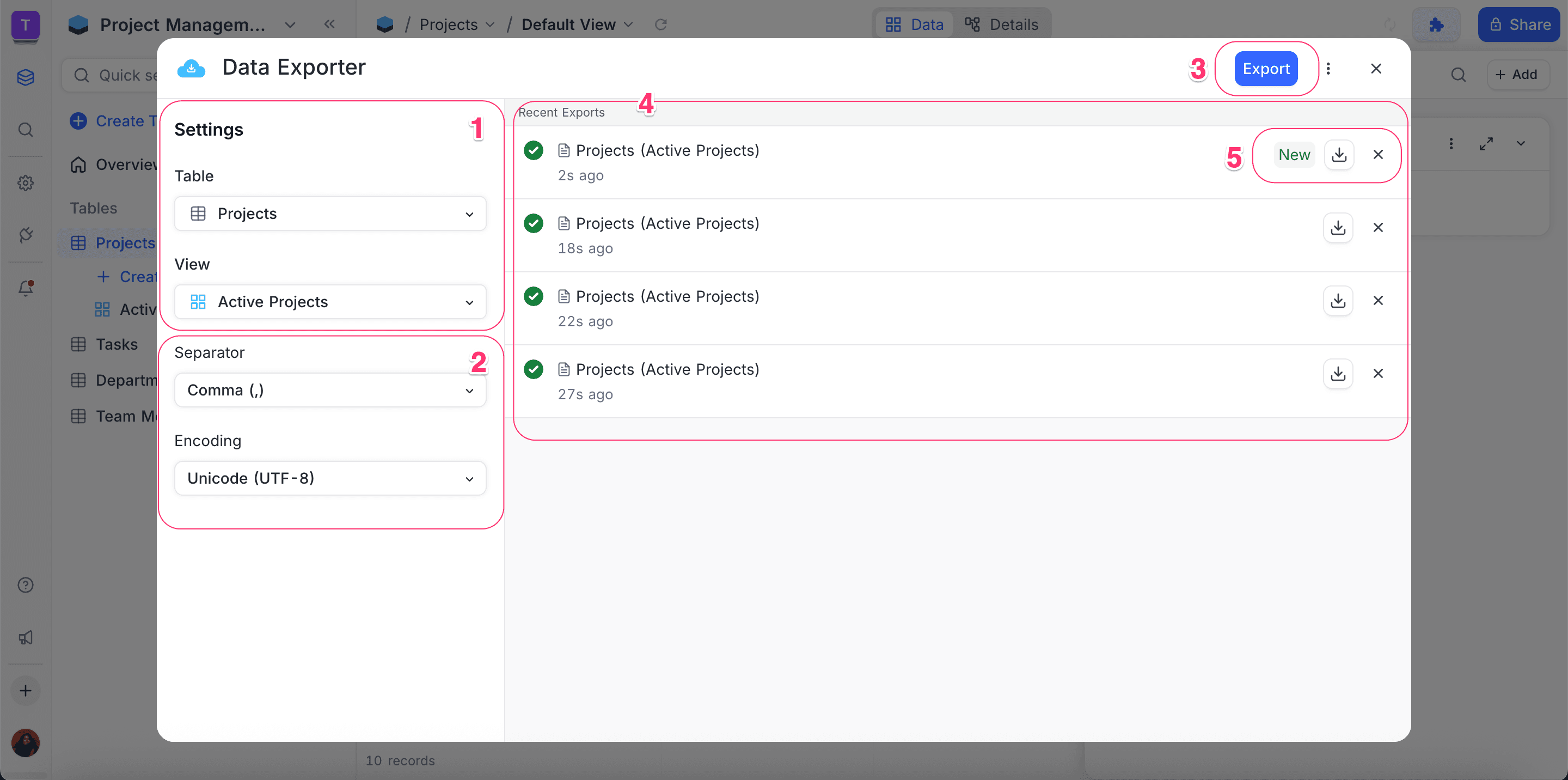
- Select the table and the view that you want to export.
- Optional: set the Separator and Encoding:
- Default separator: Comma
, - Other options: Semicolon
;, Pipe|andTab
- Default separator: Comma
- Click the Export button. When the export is complete, the file shows in the Recent Exports section.
- To save the CSV file to your local device, click the Download button.
You can set Separator and Encoding only in the expanded extension panel.
Managing Exports
Exported files are available for a limited time. NocoDB removes them automatically after 6 hours. Only you can see the files in the Recent Exports section. Other users cannot see them. You can download or remove your exports.
Downloading Exports
- In the Recent Exports section, find the file.
- To save the file to your device, click the Download icon next to it.
Removing Exports
- Find the file in the Recent Exports section.
- To remove the file from the list, click the
xicon.
Last updated on
Latest product updates?See Changelog