Iterate
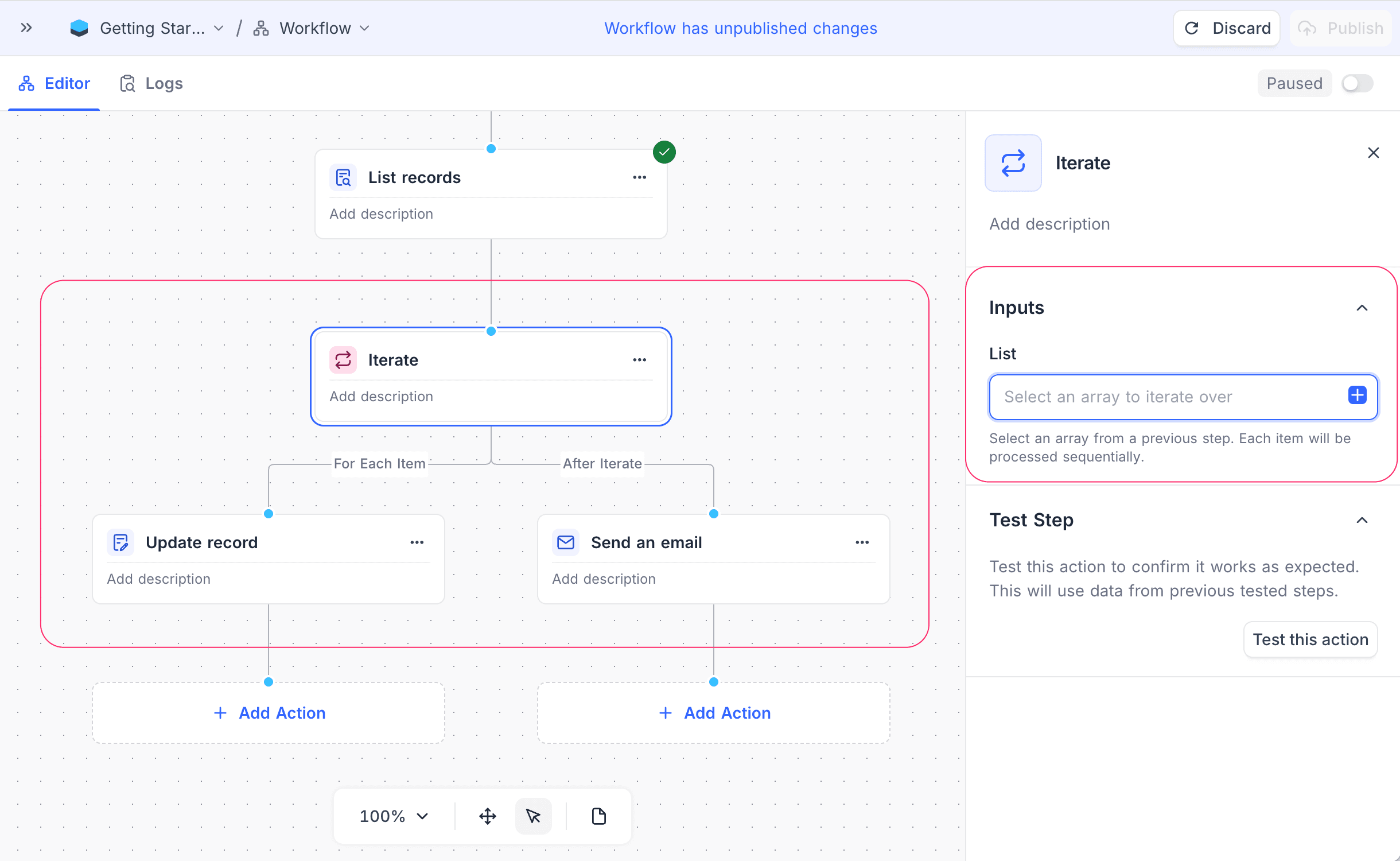
Use the Iterate node in NocoDB workflows to loop through a list of items (array). The node runs a set of actions for each item, one at a time. Use it to process many records or data entries in a batch.
Ask NocoAI
Copy a prompt, paste it into NocoAI in any base, and replace the words in [brackets] with your own.
- Every [morning], email each [Owner] their [overdue tasks]
- When a [project] is marked [Done], set each of its linked [tasks] to [Closed]
- Every [Monday], create a [check-in] record for each [active client]
Configuration
- List: Specify the array of items to iterate over. The array can come from previous nodes in the workflow.
How It Works
- The Iterate node gets an input array and processes the items one after the other.
- For each item in the array, the workflow runs the actions in the For each item branch. Thus you can handle each item separately.
- When the For each item branch is complete for all items, the workflow continues through the After iterate branch.
The workflow execution history has the logs for each iteration. Use them to monitor how NocoDB processes each item. Learn more.
Use cases
- Send personalized emails to a list of contacts
- Update many records in a database
- Make reports for each item in a dataset
Availability
- Available on the NocoDB Cloud Plus plan and higher, and on licensed on-premise deployments.
Last updated on
Latest product updates?See Changelog