NocoDB Terminologies
Learn the key terms that NocoDB uses.
Layout
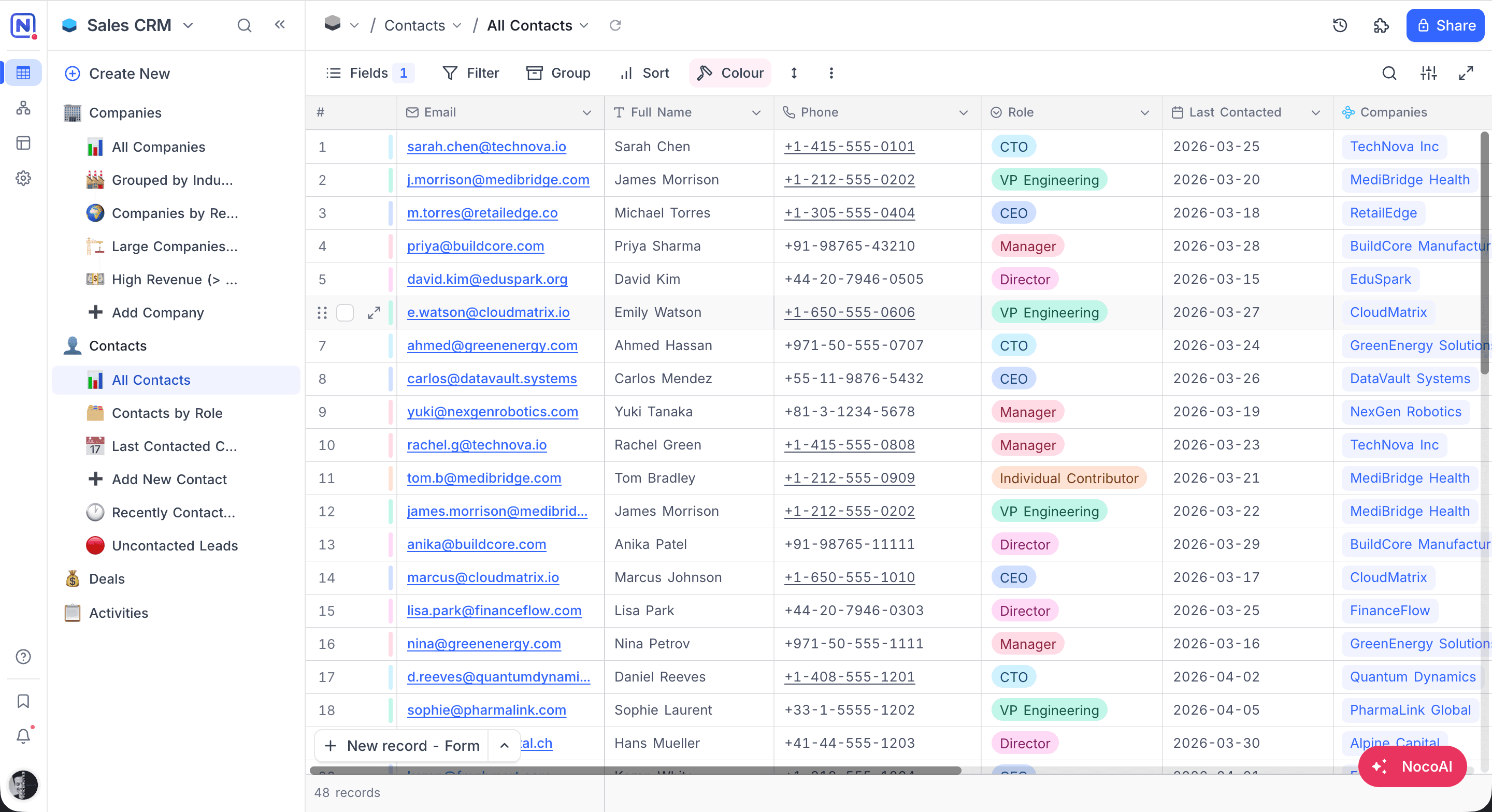
The layout below shows the main parts of NocoDB's user interface.
-
Minibar: The narrow rail on the far left. The logo at the top opens the workspace again. Below it are Data, Workflows, Interfaces and Settings. At the bottom are Help, Bookmarks, Activity and your account.
-
Sidebar: Shows the base name (for example, "Sales CRM"), a Create New button, and a tree of all tables and their views. Each table and view shows its icon, so you can identify it easily.
-
Navbar: The horizontal bar at the top. It shows the current breadcrumb path (Base > Table > View), History, Extensions and the Share button.
-
Toolbar: Below the Navbar. It has tools for the current view: Fields, Filter, Group, Sort, Colour, row height and the view actions menu. Search, Tools and fullscreen are on the right.
-
View Area: The central workspace. It shows records in the selected view format (Grid, Form, Gallery, Kanban, Calendar, Timeline, Gantt, List, or Map). Grid view shows data in rows and columns, with fields such as Email, Full Name, Phone, Role and Last Contacted.
-
Footbar: The bottom bar. It shows the total record count. If you configure them, it also shows field aggregations (for example, Filled, Min, Percent Filled).
Terminologies
Core Concepts
| Term | Description |
|---|---|
| Workspace | The top-level organizational unit. It contains one or more bases. It manages user access and permissions for all bases in it. |
| Base | A container for one or more related data sources. Each data source has multiple tables. A base is like a project workspace where you organize structured data. |
| Table | Organizes data into rows (records) and columns (fields). Each table represents one entity. Relationships can link it to other tables. |
| Field | A named column in a table. It holds values of one type (for example, text, number, date). All records in a table have the same set of fields. |
| Record | One entry in a table, shown as a row. It contains values in multiple fields. |
| Cell | The intersection of a row and a column. It holds the value of one field in one record. |
Views
| Term | Description |
|---|---|
| View | Sets how records in a table show and how you work with them. Each table can have multiple views. Each view has its own filters, sorts and field visibility. |
| Grid View | The default view. It is like a spreadsheet and shows data in rows and columns. |
| Form View | Shows fields as a form to collect data. You can share it publicly. |
| Gallery View | Shows records as cards. Use it for visual content such as images or profiles. |
| Kanban View | Puts records into columns by a Single Select or User field. Use it to track status or stages. |
| Calendar View | Shows records on a calendar by a date field. |
| Timeline View | Shows records on a horizontal timeline by date ranges. |
| Gantt View | Shows records as bars on a date axis, for project planning. It has dependency arrows, milestones and scheduling rules for each view. |
| List View | A hierarchical outline view. It shows records organized by LTAR relationships. |
| Map View | Shows records on a map from a Geometry or GeoData field. |
| Shared View | A public link to a view. A password is optional. |
| Collaborative View | A view that all base members share. Everyone sees changes to filters, sorts or field visibility. |
| Locked View | A view with a locked configuration (filters, sorts, field visibility). Nobody can change it until a Creator or Owner unlocks it. |
| Personal View | A view that only its owner can configure. All base members can still see the view and its data. Only changes to the view's configuration are restricted. |
Relationships & Computed Fields
| Term | Description |
|---|---|
| Link To Another Record (LTAR) | A field type that makes a relationship between two tables. Records in one table can then refer to records in the other table. |
| Lookup | A field that gets and shows a value from a linked table through an LTAR relationship. |
| Rollup | A field that aggregates values (for example, sum, count, average) from linked records in another table through an LTAR relationship. |
| Formula | A computed field. An expression with other fields, operators and built-in functions calculates its value. |
Automation & Integrations
| Term | Description |
|---|---|
| Webhook | Sends data to a specified URL when a configured event occurs (for example, record created, updated or deleted). Use it for integrations with external services. |
| Workflow | A visual automation that runs a sequence of actions when a trigger event occurs. It supports conditions, loops and delays. |
| Script | An automation in JavaScript. It can read and change data in tables, fields and records programmatically. |
| Integration | A configured connection to an external service or data source. NocoDB can work with it. |
| Data Source | An external database (for example, PostgreSQL, MySQL) connected to a base. NocoDB can read and write its data directly. |
Extensions & Features
| Term | Description |
|---|---|
| Dashboard | A visual canvas where you build charts and widgets that summarize data from your tables. |
| Extension | An add-on app that adds functions, for example Bulk Update, Data Exporter, Dedupe, Org Chart or Page Designer. |
| NocoDocs | The built-in document editor. It has rich text formatting, comments, AI writing help and detailed permissions. |
| NocoAI | An AI assistant. It helps you create bases, tables, fields, views, filters, formulas and select options from natural language. |
| NocoDB Sync | Copies a Grid view from another NocoDB base into this base. The copy is a read-only table that updates continuously. |
| App Sync | Syncs data from external tools, such as GitHub, GitLab, Bitbucket and Linear, into NocoDB tables. |
Roles & Permissions
| Term | Description |
|---|---|
| Workspace Owner | The user who created the workspace. This user has full administrative privileges, including management of members, roles and billing. |
| Workspace Member | A user with access to the workspace. You can give this user a role such as Owner, Creator, Editor, Commenter or Viewer. |
| Base Owner | The member who created the base, or who has the owner role. This member has full control of the base configuration and data. |
| Base Member | A user with access to a base. The user's role sets their permissions (Owner, Creator, Editor, Commenter or Viewer). |
UI Elements
| Term | Description |
|---|---|
| Expanded Record | A detailed view of one record. It opens as a side panel next to the grid (the default on desktop in all editions), or as a centered modal (shared views and mobile). You can open fullscreen mode from the side panel. |
| Modal | A UI overlay for one task, such as to edit a record or confirm an action. You cannot use the rest of the interface until you close it. |
Last updated on