Reactions & Resolve
Reactions and comment resolution help teams communicate quickly. Use an emoji to acknowledge feedback. Mark a discussion as resolved when the issue is fixed.
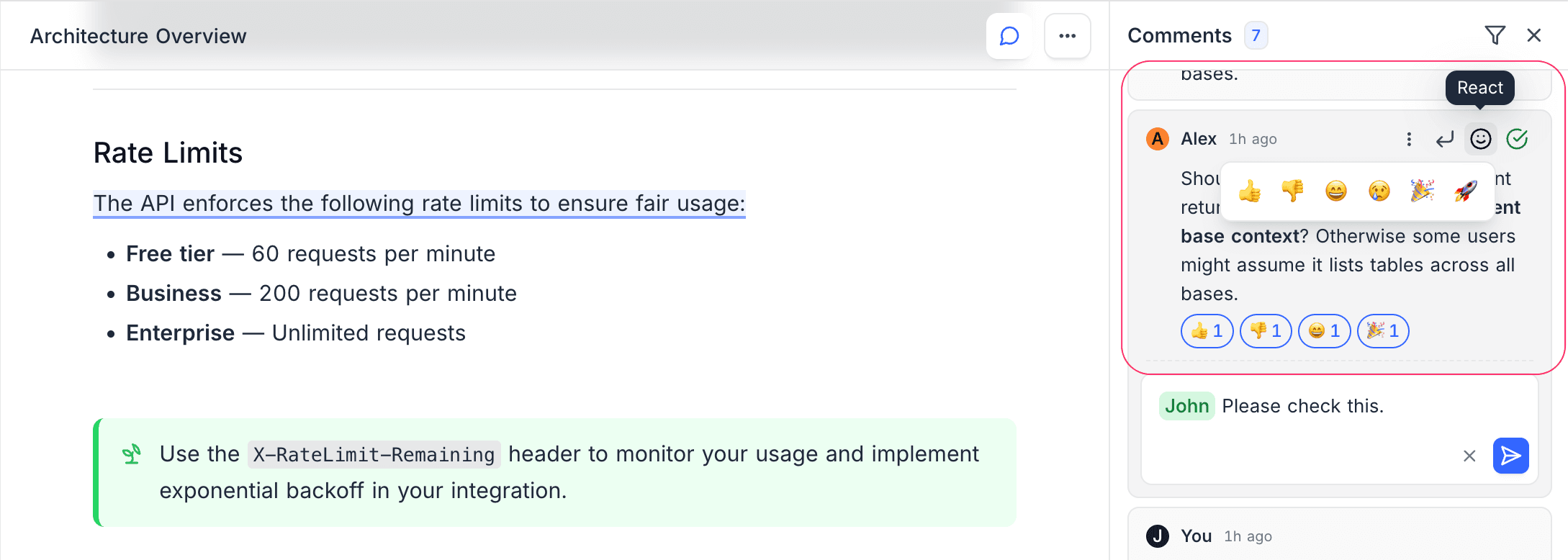
Emoji Reactions
Add a quick reaction to a comment. You do not need to write a reply.
- Hover over a comment.
- Click the reaction button (smiley face icon).
- Select an emoji.
Available Reactions
| Emoji | Meaning |
|---|---|
| Thumbs Up | Agreement or approval |
| Thumbs Down | Disagreement |
| Laugh | Funny or entertaining |
| Sad | Unfortunate or concerning |
| Party | Celebration or milestone |
| Rocket | Exciting or impressive |
- To remove your reaction, click it again.
- To see who reacted, hover over the reaction count.
Resolve Comments ☁
Mark a comment as resolved when the feedback is done. This helps you track the discussions that are still open.
- To resolve a comment, click the checkmark icon on the comment. The comment becomes dimmed.
- To hide resolved comments, use the Unresolved filter.
- To open the discussion again, click the checkmark again. The comment becomes unresolved.
Workflow Example
A typical review workflow with comments:
- A reviewer creates inline comments that show the necessary changes.
- The author makes the changes and resolves each comment.
- The reviewer uses the Unresolved filter to find items that are still open.
- When all comments are resolved, the document is ready for publication.
Availability
- Comment resolution is available on the Plus plan and above on Cloud.
- On self-hosted deployments, comment resolution is not in the Community Edition. It needs an Enterprise license.
Last updated on
Latest product updates?See Changelog