Date Dependencies
Define which records are dependent on others. When you reschedule a record, dependent records are automatically rescheduled.
Date dependencies let your project schedule update itself. When one record shifts, every record that depends on it automatically adjusts — no manual updates needed.
For example: if a design phase runs a week late, the development and QA records that follow it will automatically move forward to stay in sequence.
Requirements
Your table needs the following fields before you can enable date dependencies:
| Field | Type | Purpose |
|---|---|---|
| Start Date | Date | When the record begins |
| End Date | Date | When the record ends |
| Duration | Number or Duration | How many days the record lasts. A Number field stores days directly; a Duration field is internally converted to days. Optional — NocoDB can calculate duration from start and end dates. |
| Successor Link | Link (self-referencing Has-Many, One-to-Many, or One-to-One) | Points each row to the tasks scheduled after it. Optional — only needed if you want records to cascade automatically. |
Setting up date dependencies
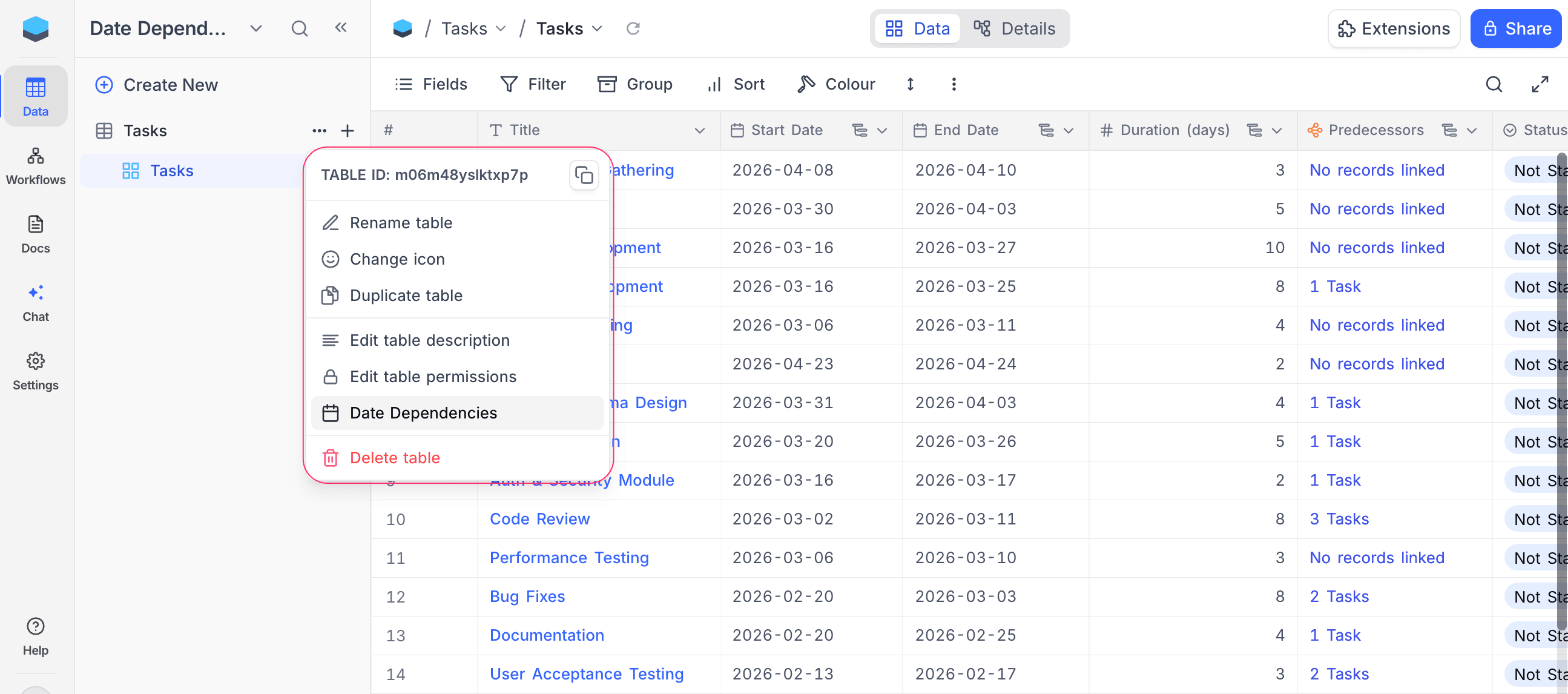
- Click
...next to the table name in the left sidebar. - Select Date Dependencies.
The dialog opens with date dependencies disabled.
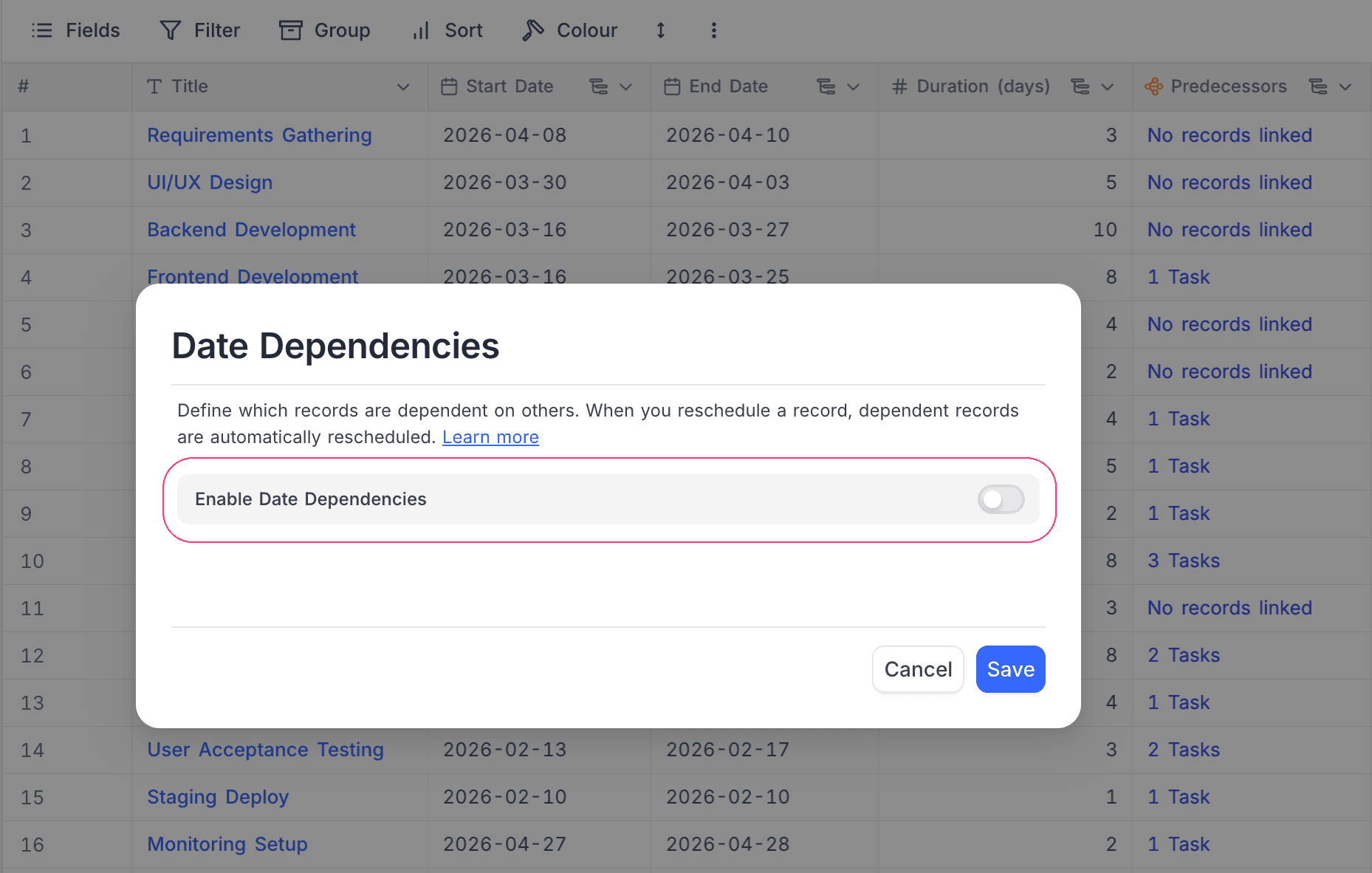
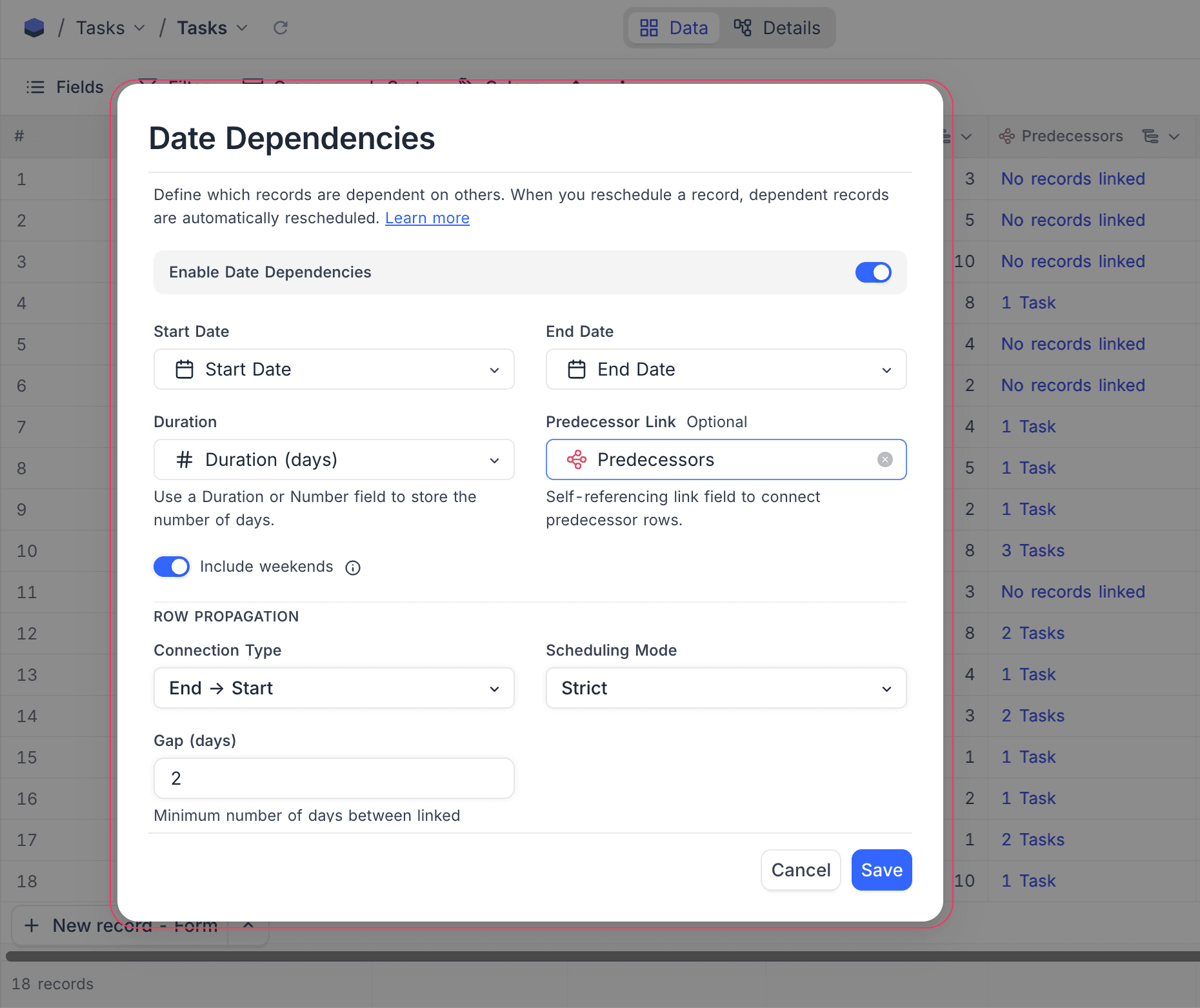
- Toggle Enable Date Dependencies on.
- Select your Start Date and End Date fields from the dropdowns.
- Optionally, select a Duration field (Duration or Number type).
- Optionally, select a Successor Link field to enable automatic cascading across records.
- Click Save.
Include weekends
By default, date calculations include all calendar days (weekends included). Turn off Include weekends to skip Saturdays and Sundays in every calculation.
When Include weekends is turned off:
- Duration counts only business days (Mon–Fri). A record spanning Monday to Friday = 5 days, not 7.
- End Date skips weekends. A record starting Monday with a 6-day duration ends on the following Monday (skipping Saturday and Sunday).
- Cascading places dependent records on the next business day — never on a Saturday or Sunday.
How fields stay in sync within a record
Once enabled, NocoDB keeps the date fields in sync whenever you edit a record:
| You change… | NocoDB auto-updates… |
|---|---|
| Start Date | End Date moves to keep the same duration |
| End Date | Duration recalculates to match the new span |
| Duration | End Date adjusts to the new length |
When all three fields are present, Start Date and End Date take priority and duration is recalculated.
Duration counting is inclusive — a record from Jan 1 to Jan 10 has a duration of 10 days (both start and end dates are counted). A duration of 0 is valid and represents a same-day task where start and end dates are equal.
All calculations respect the Include weekends setting.
Row propagation
When you set a Successor Link field, NocoDB can automatically shift dependent records to keep your timeline consistent. Cascading works in both directions:
- Forward — when a predecessor's dates change, successors shift later to avoid overlap.
- Backward — when a successor is moved earlier and collides with its predecessor, the predecessor shifts earlier to make room.
Scheduling mode
Choose how linked records respond when dates change:
| Mode | What happens |
|---|---|
| Off | No automatic rescheduling across linked records. Only within-record field sync applies. |
| Flexible | Only adjust when dates overlap or violate the gap. If there's already enough space, nothing moves. |
| Strict | Always snap to the exact gap — no slack allowed. Records shift even when there's no overlap. |
Flexible vs Strict — example
Consider two records with End → Start connection and Gap = 2 days:
Before — gap is 9 days (well above the required 2):

Design:      ████████████
Development:                              ████████████
             Jan 1    Jan 10              Jan 20    Jan 29
                              ←── 9 days ──→
Now you move Design's End Date to Jan 14:
Flexible — gap shrinks to 5, still ≥ 2, so nothing moves:

Design:      ████████████████
Development:                              ████████████
             Jan 1        Jan 14          Jan 20    Jan 29
                              ←─ 5 days ─→  ✓ no violation
Strict — snaps to exact gap of 2, Development shifts:
Design: ████████████████
Development: ████████████
Jan 1 Jan 14 Jan 17 Jan 26
←2→Put simply: Flexible only prevents overlap, Strict enforces the exact spacing at all times.
Connection type
Choose how predecessor and successor records relate to each other:
| Type | Meaning | Example |
|---|---|---|
| End → Start | Successor starts after predecessor ends | Design ends → Development begins. Most common. |
| Start → Start | Successor starts after predecessor starts | Design begins → QA monitoring begins alongside it. |
| End → End | Successor ends after predecessor ends | Development ends → Documentation wraps up at the same time. |
| Start → End | Successor ends after predecessor starts | Setup must be done before the event kicks off. |
Connection type examples
The examples below use Strict mode with Gap = 0 to show how each connection type works. The predecessor is Design (Jan 1 – Jan 10, 10 days).
End → Start — Development starts the day after Design ends:
| Record | Start Date | End Date | Duration |
|---|---|---|---|
| Design | Jan 1 | Jan 10 | 10 days |
| Development | Jan 11 | Jan 20 | 10 days |
If Design's End Date moves to Jan 15, Development shifts to start on Jan 16.
Start → Start — Development starts the same day as Design:
| Record | Start Date | End Date | Duration |
|---|---|---|---|
| Design | Jan 1 | Jan 10 | 10 days |
| Development | Jan 1 | Jan 10 | 10 days |
If Design's Start Date moves to Jan 5, Development shifts to start on Jan 5.
End → End — Development ends the same day as Design:
| Record | Start Date | End Date | Duration |
|---|---|---|---|
| Design | Jan 1 | Jan 10 | 10 days |
| Development | Jan 1 | Jan 10 | 10 days |
If Design's End Date moves to Jan 15, Development shifts so it ends on Jan 15 (Start Date adjusts to Jan 6 to maintain duration).
Start → End — Development ends the same day as Design starts:
| Record | Start Date | End Date | Duration |
|---|---|---|---|
| Design | Jan 1 | Jan 10 | 10 days |
| Development | Dec 23 | Jan 1 | 10 days |
If Design's Start Date moves to Jan 5, Development shifts so it ends on Jan 5 (Start Date adjusts to Dec 27 to maintain duration).
Gap (days)
Set a minimum buffer between records. For example, with End → Start connection type:
- Gap = 0 — the successor starts the day right after the predecessor ends.
- Gap = 3 — there's a 3-day buffer between the predecessor ending and the successor starting.
When Include weekends is turned off, gap days count only business days.
Examples
Basic cascade (Strict, End → Start, Gap = 0)
Three records in sequence — Design → Development → QA:
Before:

Design:      ██████████
Development:           ██████████
QA:                               ██████████
             Jan 1  Jan 10  Jan 20  Jan 30
Design overruns — you move its End Date to Jan 20. NocoDB shifts the rest automatically:
After — cascade ripples forward:

Design:      ████████████████████
Development:                     ██████████
QA:                                         ██████████
             Jan 1            Jan 20     Jan 30     Feb 9
Each successor keeps its original duration and the sequence stays intact.
Backward cascade (Strict, End → Start, Gap = 0)
Same three records. You move Development backward so it starts on Jan 5 — colliding with Design which ends Jan 10:
Before:

Design:      ██████████
Development:           ██████████
QA:                               ██████████
             Jan 1  Jan 10  Jan 20  Jan 30
You move Development to Jan 5 — it now overlaps Design:
Design: ██████████
Development: ██████████
Jan 5 Jan 14
↑ collision!NocoDB pushes Design earlier to make room:
After — Design shifts backward:

Design: ██████████
Development:       ██████████
QA:                                    ██████████
        Dec 26  Jan 4  Jan 5  Jan 14   Jan 21  Jan 30
Design keeps its original duration and shifts backward so Development can start on Jan 5 without overlap.
Working days cascade
Same setup but with Include weekends turned off. Design ends on Friday Jan 10:
| Record | Start Date | End Date | Duration |
|---|---|---|---|
| Design | Mon, Jan 6 | Fri, Jan 10 | 5 days |
| Development | Mon, Jan 13 | Fri, Jan 17 | 5 days |
Development starts on Monday — the next business day — not Saturday.
Automations and webhooks
When NocoDB automatically reschedules dependent records, any automations or webhooks configured on the table will fire for those updated records — so you can notify your team, update a connected tool, or trigger any follow-up action.
Things to know
- Each table supports one date dependency configuration.
- Start Date and End Date must be Date fields (not DateTime).
- Duration must be a Duration or Number field.
- The Successor Link must be a self-referencing link field (Has-Many, One-to-Many, or One-to-One).
- Include weekends applies everywhere — both within-record field sync and cascading across records.
- Row propagation (cascade across linked records) is only supported on PostgreSQL and MySQL 8+ data sources.
- When dependent records are automatically rescheduled, they are briefly highlighted with a light yellow background in the grid to indicate which records were modified. The highlight fades after about 2 seconds.
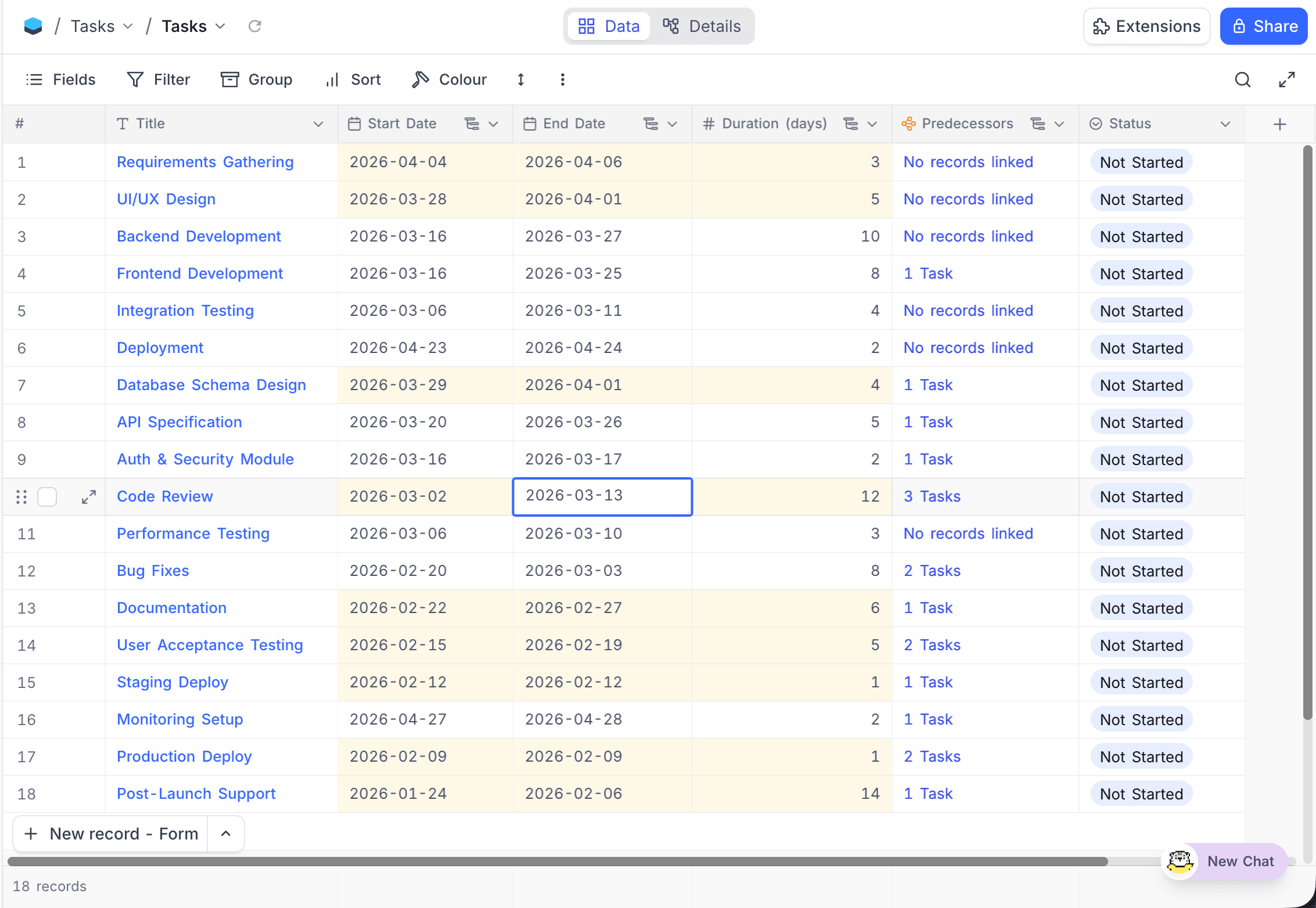
- Fields that are part of an active date dependency configuration are marked with a small icon in their column header. Hovering the icon shows a "Date dependencies enabled" tooltip.
- If you delete a Start Date or End Date field that is referenced by a date dependency configuration, the configuration is automatically deactivated. Deleting a Duration or Successor Link field clears only that field reference — the configuration may remain active.
- Cascade-propagated row updates are logged as a distinct cascade update in the audit trail, so you can distinguish them from manual edits.
- Sibling records are not re-propagated. When a record is moved backward and its predecessor is pushed earlier, other successors of that predecessor (sibling records) are not automatically re-evaluated. Only the direct chain — predecessors upward and successors downward from the edited record — is adjusted. To update sibling records, edit any one of them to trigger a fresh cascade.
FAQs
What's the difference between Flexible and Strict?
Flexible only moves records when they would overlap or violate the gap — if there's already enough space, nothing changes. Strict always enforces the exact gap you've set, moving records even when there's no overlap.
What if two records depend on each other in a loop?
NocoDB detects circular dependencies and stops the cascade safely. No records will be updated in a loop.
Do automations fire when dates are rescheduled automatically?
Yes — any automations or webhooks on the table fire for all records that are updated as part of a cascade.
What does "Include weekends" do?
When turned on (default), all calendar days including weekends are counted. When turned off, Saturdays and Sundays are skipped in all date calculations — duration counts only Mon–Fri, end dates land on weekdays, and rescheduled records never start on a weekend.
Which databases support row propagation?
Cascade propagation across linked records requires PostgreSQL or MySQL 8+. On other databases (SQLite, etc.), only within-record field sync (Start Date / End Date / Duration calculations) is available.