Output Methods
The output object has methods that show information to users while the script runs. Use these methods to create formatted output in different styles. You can show results, show progress, and present data in a readable format.
Overview
Use the output methods to:
- Display plain text messages
- Format content with Markdown for better readability
- Present data in formatted tables
- Inspect complex objects in an expandable format
- Clear previous output content
These methods give users clear, structured information about what your script does and what results it gives. This makes a better user experience.
Available Methods
output.text(message)
Shows plain text in the output area.
Parameters:
message(string | number | boolean | null): The message to display
Example:
// Basic usage
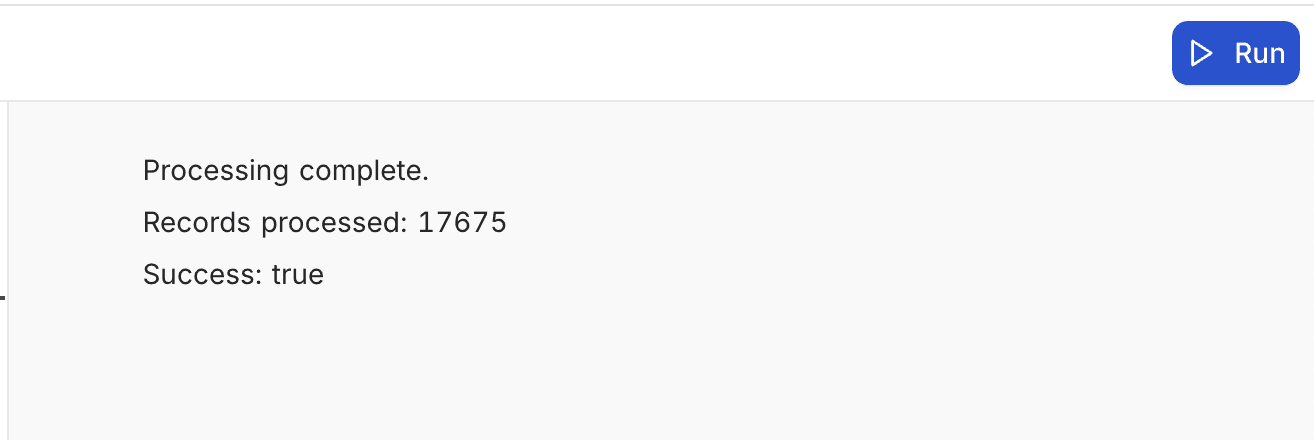
output.text('Processing complete.');

// Display numbers or other values
output.text(`Records processed: ${recordCount}`);
output.text(`Success: ${isSuccess}`);
Output:
output.markdown()
Renders text with Markdown formatting.
Parameters:
content(string): The Markdown content to render
Example:
// Basic heading and text
output.markdown('# Monthly Sales Report');
output.markdown('Report generated on ' + new Date().toLocaleDateString());

// Lists
output.markdown('## Key Findings\n\n' +
  '* Sales increased by 15% compared to last month\n' +
  '* Top product: Widget X (1,245 units)\n' +
  '* Top region: West (42% of total)');

// Tables
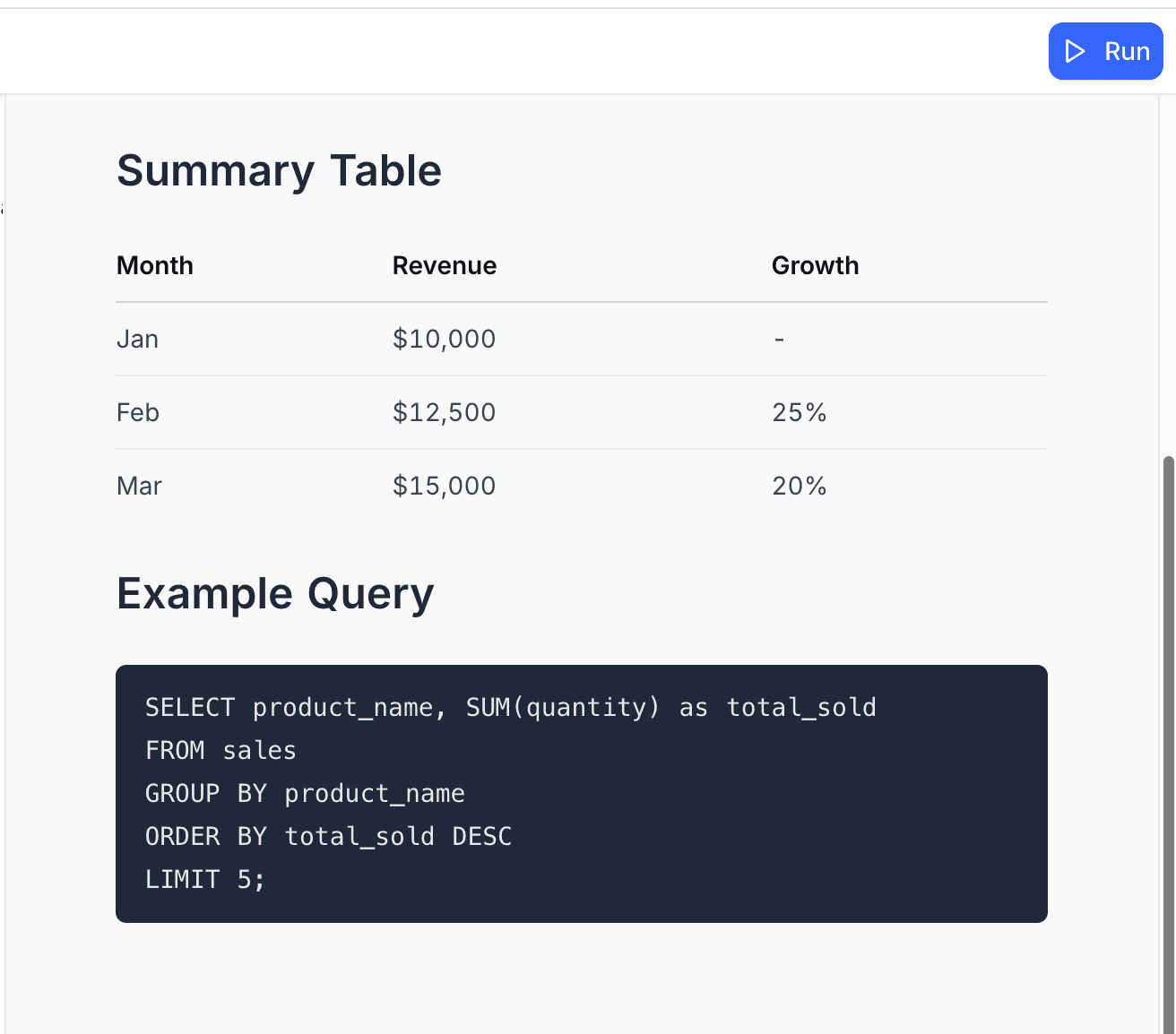
output.markdown('## Summary Table\n\n' +
  '| Month | Revenue | Growth |\n' +
  '|-------|---------|--------|\n' +
  '| Jan   | $10,000 | -      |\n' +
  '| Feb   | $12,500 | 25%    |\n' +
  '| Mar   | $15,000 | 20%    |');

// Code blocks
output.markdown('## Example Query\n\n' +
  '```sql\n' +
  'SELECT product_name, SUM(quantity) as total_sold\n' +
  'FROM sales\n' +
  'GROUP BY product_name\n' +
  'ORDER BY total_sold DESC\n' +
  'LIMIT 5;\n' +
  '```');
Output:
output.table()
Shows data in a formatted table.
Parameters:
data(Array<object> | object): An array of objects, with one object for each row, or a single object to show
Example:
// Display array of objects as table
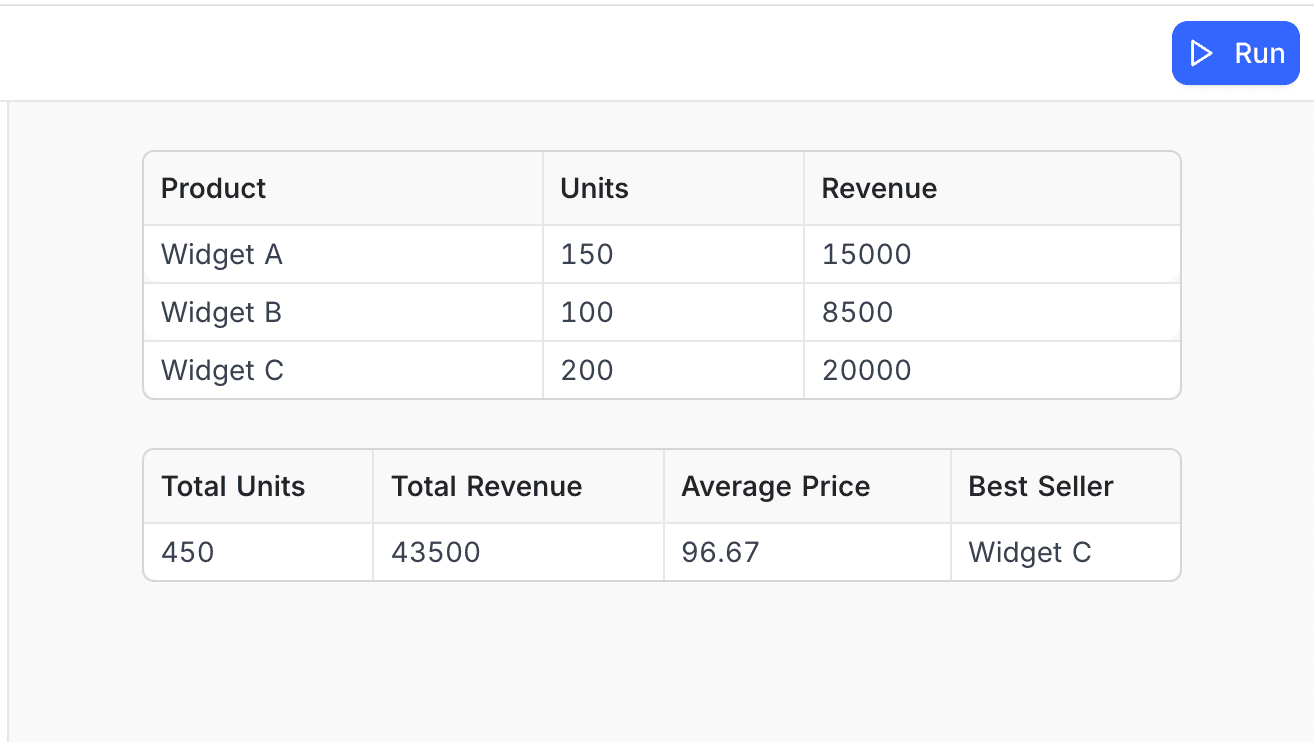
const salesData = [
  { Product: 'Widget A', Units: 150, Revenue: 15000 },
  { Product: 'Widget B', Units: 100, Revenue: 8500 },
  { Product: 'Widget C', Units: 200, Revenue: 20000 }
];

output.table(salesData);

// Display a single object as a table
const summary = {
  'Total Units': 450,
  'Total Revenue': 43500,
  'Average Price': 96.67,
  'Best Seller': 'Widget C'
};

output.table(summary);
Output:
output.inspect()
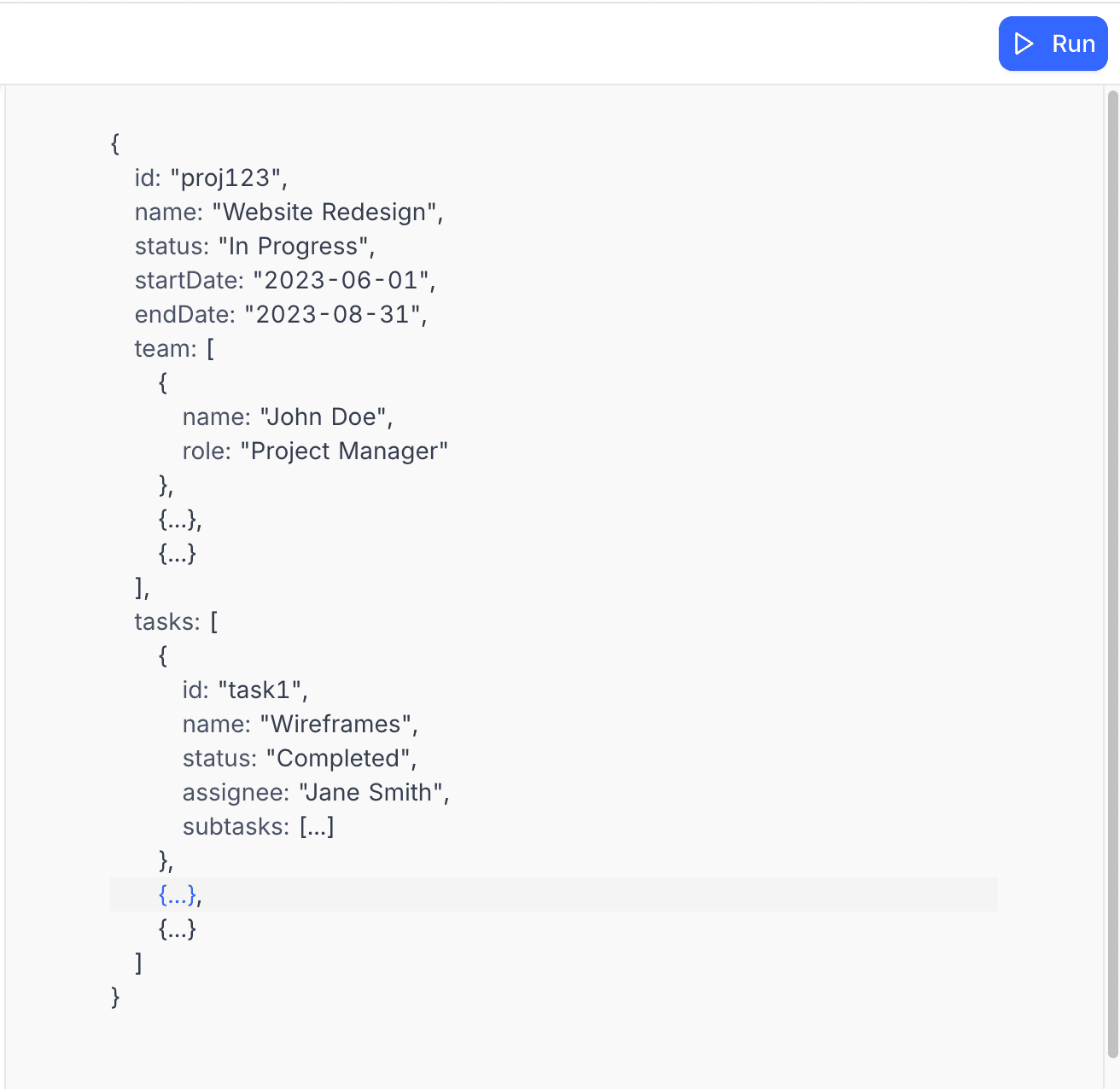
Shows an object in an expandable, interactive format, so you can inspect it.
Parameters:
data(any): The data to inspect
Example:
// Inspect a complex object
const projectData = {
  id: 'proj123',
  name: 'Website Redesign',
  status: 'In Progress',
  startDate: '2023-06-01',
  endDate: '2023-08-31',
  team: [
    { name: 'John Doe', role: 'Project Manager' },
    { name: 'Jane Smith', role: 'Designer' },
    { name: 'Bob Johnson', role: 'Developer' }
  ],
  tasks: [
    {
      id: 'task1',
      name: 'Wireframes',
      status: 'Completed',
      assignee: 'Jane Smith',
      subtasks: [
        { name: 'Homepage wireframe', completed: true },
        { name: 'About page wireframe', completed: true },
        { name: 'Contact page wireframe', completed: true }
      ]
    },
    {
      id: 'task2',
      name: 'Design',
      status: 'In Progress',
      assignee: 'Jane Smith',
      subtasks: [
        { name: 'Homepage design', completed: true },
        { name: 'About page design', completed: false },
        { name: 'Contact page design', completed: false }
      ]
    },
    {
      id: 'task3',
      name: 'Development',
      status: 'Not Started',
      assignee: 'Bob Johnson',
      subtasks: [
        { name: 'Frontend setup', completed: false },
        { name: 'Homepage implementation', completed: false },
        { name: 'Testing', completed: false }
      ]
    }
  ]
};

output.inspect(projectData);
Output:
output.clear()
Clears all previous output content.
Example:
// Clear previous output before showing new results
output.clear();
output.markdown('# New Results');
output.text('Previous output has been cleared.');
Practical Examples
Creating a Structured Report
// Structured report with sections and formatting
async function generateSalesReport() {
  // Get the Sales table
  const salesTable = base.getTable('Sales');

  // Query sales data
  const salesData = await salesTable.selectRecordsAsync({
    fields: ['Date', 'Product', 'Quantity', 'Unit Price', 'Total', 'Region']
  });

  // Clear any previous output
  output.clear();

  // Report header
  output.markdown('# Monthly Sales Report');
  output.markdown(`Generated on: ${new Date().toLocaleDateString()}`);
  output.markdown(`Data period: ${getLastMonthRange()}`);

  // Summary metrics
  const totalSales = calculateTotalSales(salesData.records);
  const totalUnits = calculateTotalUnits(salesData.records);
  const averageOrderValue = totalSales / salesData.records.length;

  output.markdown('## Summary Metrics');

  const summaryData = {
    'Total Sales': `$${totalSales.toLocaleString()}`,
    'Total Units Sold': totalUnits.toLocaleString(),
    'Number of Orders': salesData.records.length.toLocaleString(),
    'Average Order Value': `$${averageOrderValue.toFixed(2)}`,
    'Average Units per Order': (totalUnits / salesData.records.length).toFixed(1)
  };

  output.table(summaryData);

  // Products breakdown
  output.markdown('## Product Performance');

  const productData = getProductBreakdown(salesData.records);
  output.table(productData);

  // Regional breakdown
  output.markdown('## Regional Performance');

  const regionData = getRegionalBreakdown(salesData.records);
  output.table(regionData);


  // Daily trend
  output.markdown('## Daily Sales Trend');
  output.text('Daily sales for the past month:');

  const dailyData = getDailySales(salesData.records);
  output.table(dailyData);

  // Helper functions
  function getLastMonthRange() {
    const today = new Date();
    const lastMonth = new Date(today);
    lastMonth.setMonth(lastMonth.getMonth() - 1);

    return `${lastMonth.toLocaleDateString()} - ${today.toLocaleDateString()}`;
  }

  function calculateTotalSales(records) {
    return records.reduce((sum, record) => {
      return sum + (record.getCellValue('Total') || 0);
    }, 0);
  }

  function calculateTotalUnits(records) {
    return records.reduce((sum, record) => {
      return sum + (record.getCellValue('Quantity') || 0);
    }, 0);
  }

  function getProductBreakdown(records) {
    const productMap = {};

    for (const record of records) {
      const product = record.getCellValue('Product');
      const quantity = record.getCellValue('Quantity') || 0;
      const total = record.getCellValue('Total') || 0;

      if (!product) continue;

      if (!productMap[product]) {
        productMap[product] = {
          units: 0,
          sales: 0
        };
      }

      productMap[product].units += quantity;
      productMap[product].sales += total;
    }

    // Convert to array for table display
    return Object.entries(productMap).map(([product, data]) => ({
      'Product': product,
      'Units Sold': data.units,
      'Revenue': `$${data.sales.toLocaleString()}`,
      'Average Price': `$${(data.sales / data.units).toFixed(2)}`
    }));
  }

  function getRegionalBreakdown(records) {
    const regionMap = {};

    for (const record of records) {
      const region = record.getCellValue('Region') || 'Unknown';
      const total = record.getCellValue('Total') || 0;

      if (!regionMap[region]) {
        regionMap[region] = 0;
      }

      regionMap[region] += total;
    }

    // Calculate total for percentages
    const grandTotal = Object.values(regionMap).reduce((sum, val) => sum + val, 0);

    // Convert to array for table display
    return Object.entries(regionMap).map(([region, sales]) => ({
      'Region': region,
      'Revenue': `$${sales.toLocaleString()}`,
      'Percentage': `${((sales / grandTotal) * 100).toFixed(1)}%`
    }));
  }

  function getDailySales(records) {
    const dailyMap = {};

    for (const record of records) {
      const dateValue = record.getCellValue('Date');
      if (!dateValue) continue;

      const date = new Date(dateValue);
      const dateString = date.toISOString().split('T')[0]; // YYYY-MM-DD
      const total = record.getCellValue('Total') || 0;

      if (!dailyMap[dateString]) {
        dailyMap[dateString] = 0;
      }

      dailyMap[dateString] += total;
    }

    // Convert to array and sort by date
    return Object.entries(dailyMap)
      .map(([date, sales]) => ({
        'Date': new Date(date).toLocaleDateString(),
        'Sales': `$${sales.toLocaleString()}`
      }))
      .sort((a, b) => new Date(a.Date) - new Date(b.Date));
  }
}

// Run the report
await generateSalesReport();
Best Practices
-
Use clear headings: Organize your output with markdown headings. This gives a logical structure that is easy to scan.
-
Include timestamps: Add timestamps to long-running processes. Users then know when actions occurred.
-
Use the right output type: Choose the correct output method for your content:
text()for simple messagesmarkdown()for formatted content with headers and liststable()for tabular datainspect()for complex nested objects
-
Show progress updates: For long-running operations, show regular progress updates. Users then know that the script still runs.
-
Provide summary information: Include summary metrics and totals. They give users a quick overview of the results.
-
Format numbers and dates: Use
toLocaleString(),toFixed(), and other formatting methods. They make numbers and dates easier to read. -
Use visual elements: Use markdown features, for example lists, tables, and code blocks, to make the output easier to read.
-
Keep error messages informative: Write clear, actionable error messages. Tell users what went wrong and how to fix it.
Related
Last updated on